A reset for Command Center
Last updated: September 19, 2026
By Ashok Seetharam, Product, PAXAFE
CONTXT v3.0 ships on October 1, 2026. This is the story of why we took the shipment page apart and what we built in its place.
There is never a good time to redesign
Every product that ships often accumulates design debt. Ours did too.
The shipment page was the busiest screen in CONTXT and the one we touched most, and each change made sense on the day.
A new data type earned a card. A new field went into the accordion at the bottom.
A new control landed wherever there was room, sometimes in the page header, sometimes inside a panel.
None of it was wrong. All of it added up.
The result was a page you had to read top to bottom to answer a simple question: is this shipment fine, and if not, what do I do. Details were spread across stacked cards. The things you needed for a decision sat next to things you did not. Where a button lived depended on which button you wanted.
The Live Risk section had the same problem in a deeper form. We designed it early, when we understood a fraction of the data we now receive. Real world use-cases taught us what the data really looks like, across carriers, devices, lanes and the ways shipments go wrong in practice. The section that first showed a risk score was no longer the right shape for what we knew.
We could have kept patching. Instead we stopped adding to the page and started over.
The previous shipment page: a stack of cards, with details in an accordion at the bottom
What we were really watching for
Sitting with people who run shipments for a living, the pattern was the same in every session. Scroll the stack. Open the accordion. Click into a panel. Scroll back up. Open a second tab to check something the page already knew. The page held the answer, but it made you assemble it.
Coverage was the other gap. Live Risk only ran on shipments with an active device. Every shipment tracked through the carrier alone got no verdict, so on those the reading fell back to the person: product status here, delivery status there, a pane full of numbers and no conclusion.
Numbers are not the hard part. Any platform can show a temperature and a delay. The hard part is reading them together, deciding what they mean for this product on this lane, and saying what to do about it. That is a job for an agent, and it is the job the redesign is built around.
Four things we decided early
Pay the debt on purpose. A redesign is expensive. A slow decline is more expensive, paid a few seconds at a time by everyone who uses the product. We chose to pay it once.
Show only what you need to act. Every element on the page had to earn its place by answering a question someone asks while deciding what to do. Everything else moved to a hover panel or a drawer. Still one gesture away, no longer in the way.
Put every action in one place. All the actions on a shipment now sit in the top right corner. Copy, share, download, files, comments and history in the top bar. Edit, complete and cancel under the three dots on the header card. You learn the corner once and it holds on every page.
Let the agent read first. The Live Risk Agent reads carrier milestones, device pings, silent devices and stale predictions, flight and vessel delays, external events, and the limits in your own standard operating procedures (SOPs). Then it states one verdict, one reason and one recommended action. The verdict is the same on the map, in the list and on the page, so a team never argues about which screen is right.
What changed
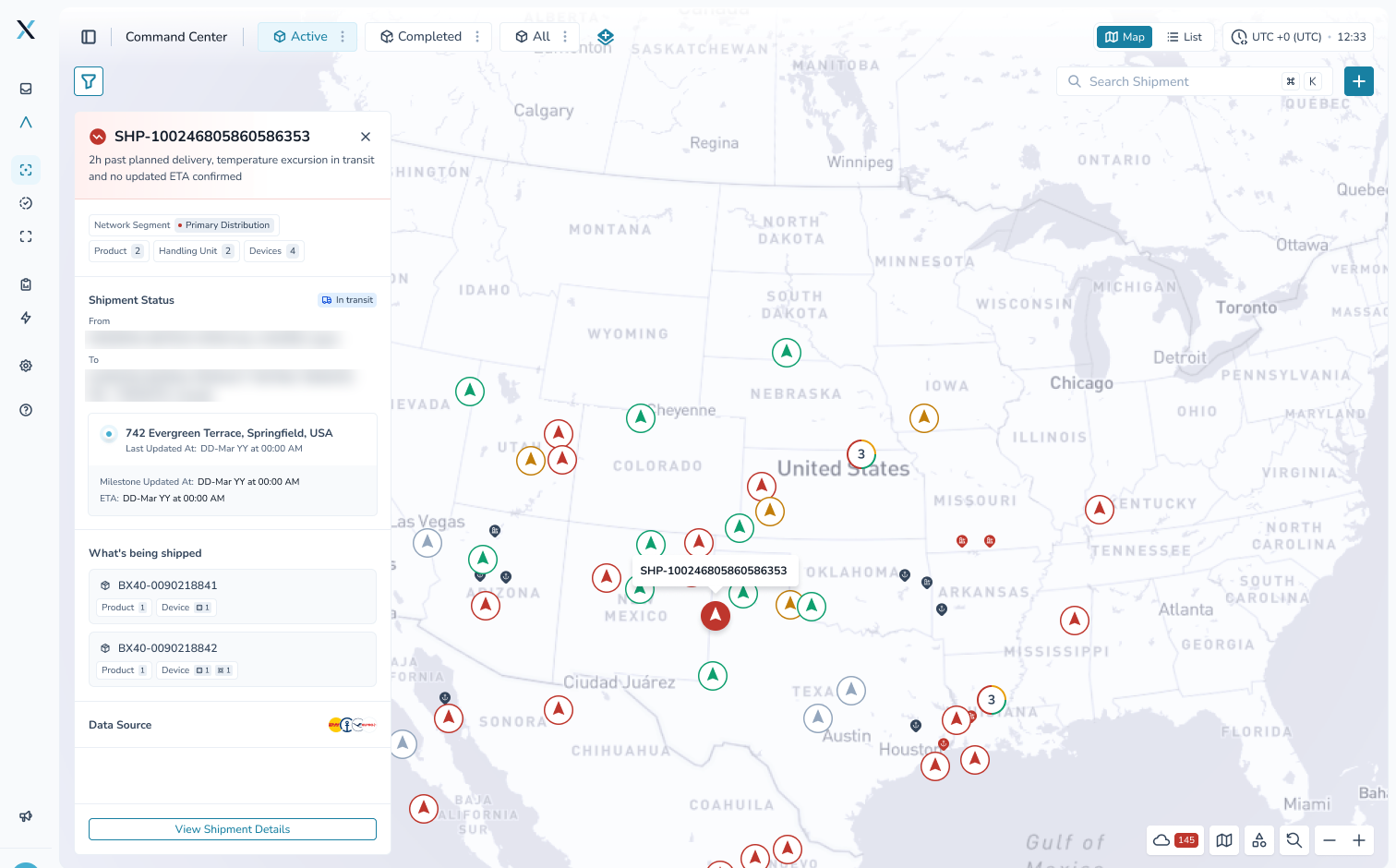
The dashboard. Click a marker and a quick details card opens on the map with the verdict, the status, the last known location and what is on board. Triage happens on the map. The full page becomes a choice rather than a toll gate.
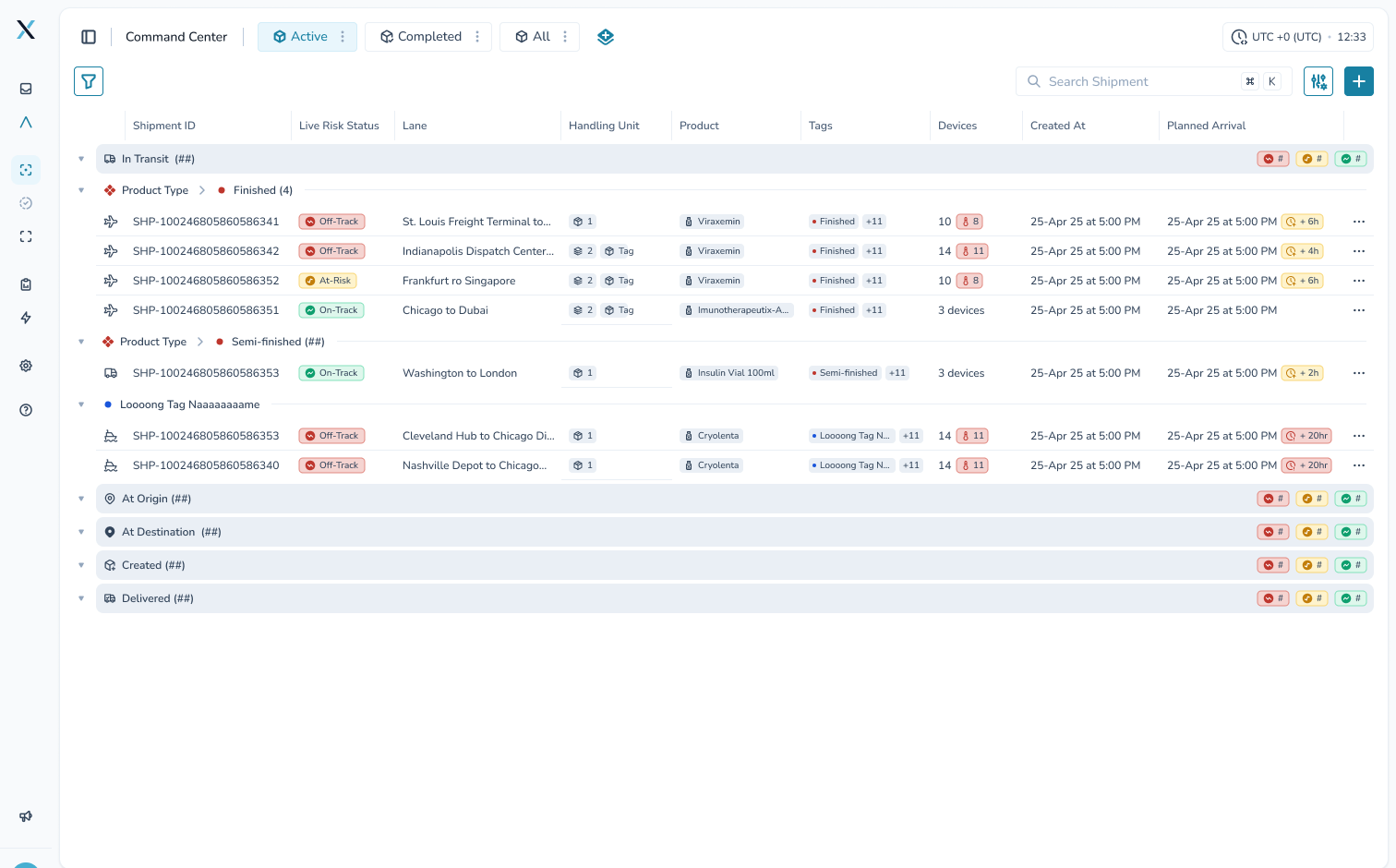
The list. Two new columns, Mode of Transportation and Handling Unit. Verdict counts on every group bar. Hover cards on products, handling units and verdicts. Two shortcuts for folding groups: T for the one under your mouse, Alt-click for all of them. You see where a whole group stands before you open anything.
The shipment page. A header card with the essentials: the ID, the verdict icon, the product, handling unit and device chips. The journey and the last known location beside it. Reference details such as order numbers, carrier references, tags and notification recipients moved into a hover panel. The map is context, not the headline.
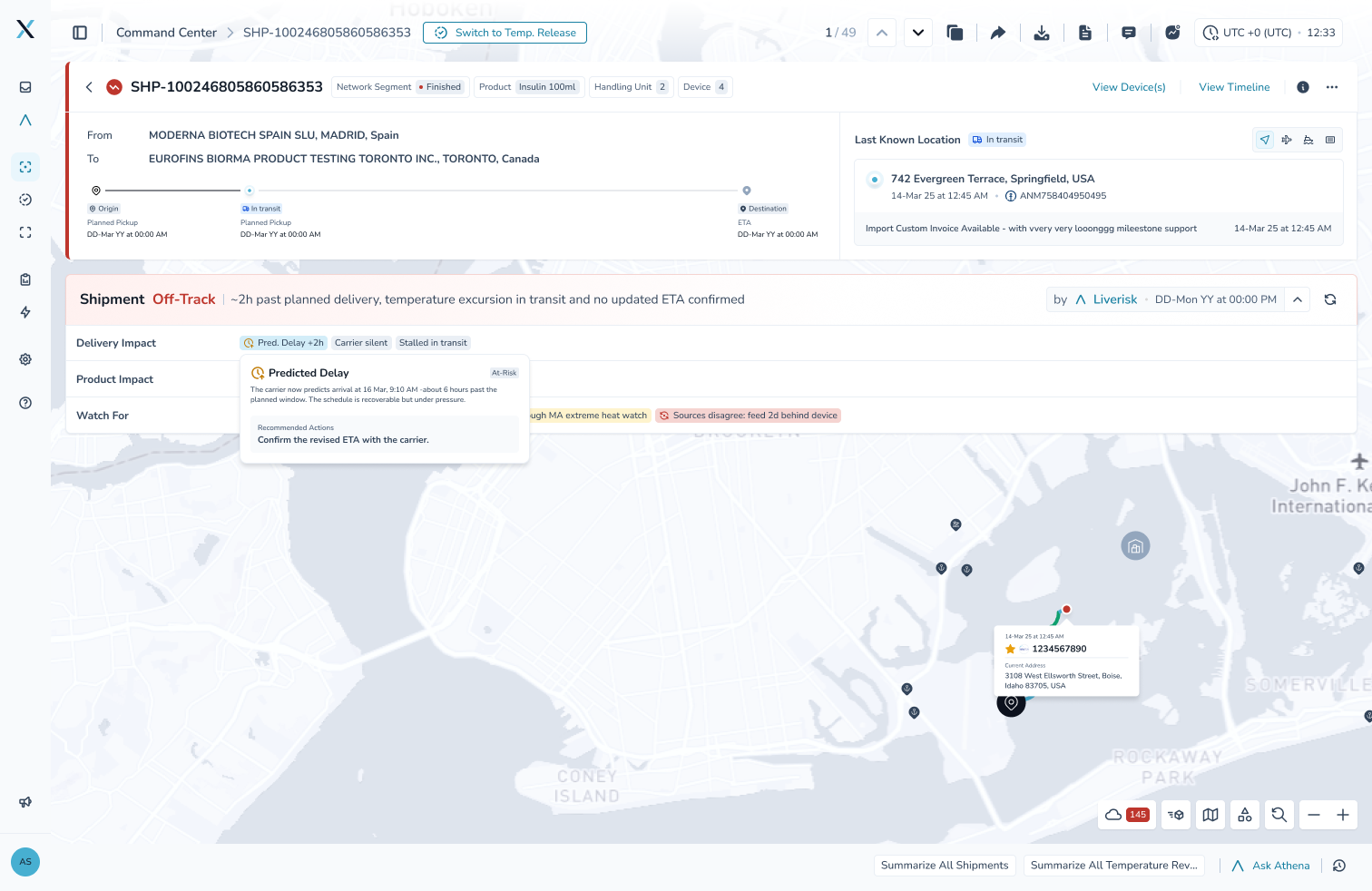
The Live Risk Agent. A band under the header states the verdict in one sentence, then three rows: Delivery Impact, Product Impact and Watch For. Hover any chip and the card ends with a recommended action. The vocabulary is On-Track, At-Risk and Off-Track, and it now applies to every active shipment, with a device or without.

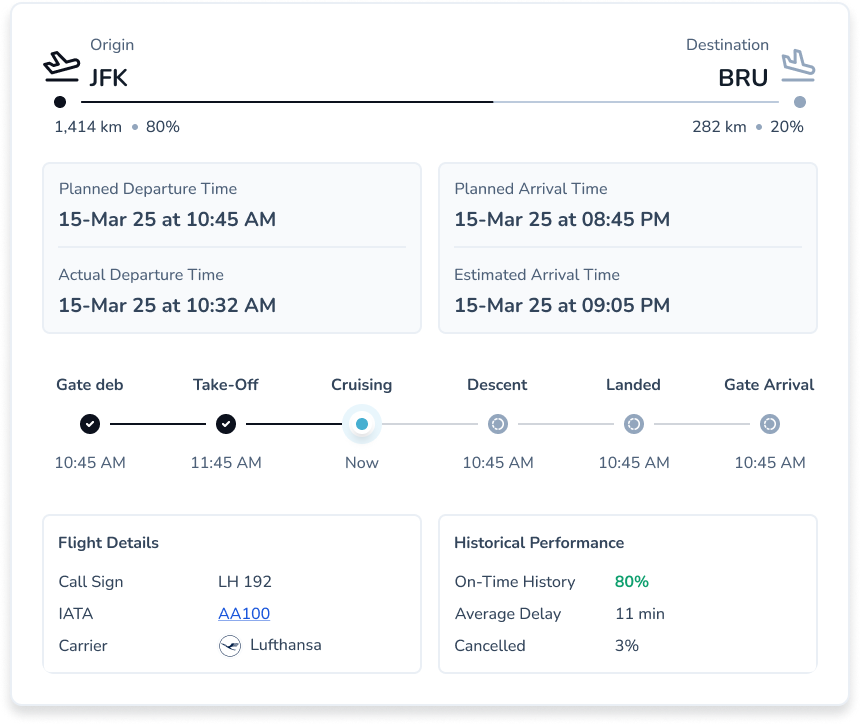
Tracking. Flight, vessel and container tracking cards live inside the Last Known Location card, next to the position they explain. The timeline and the devices open beside the map. Files, comments and history open in drawers, so you never lose your place.
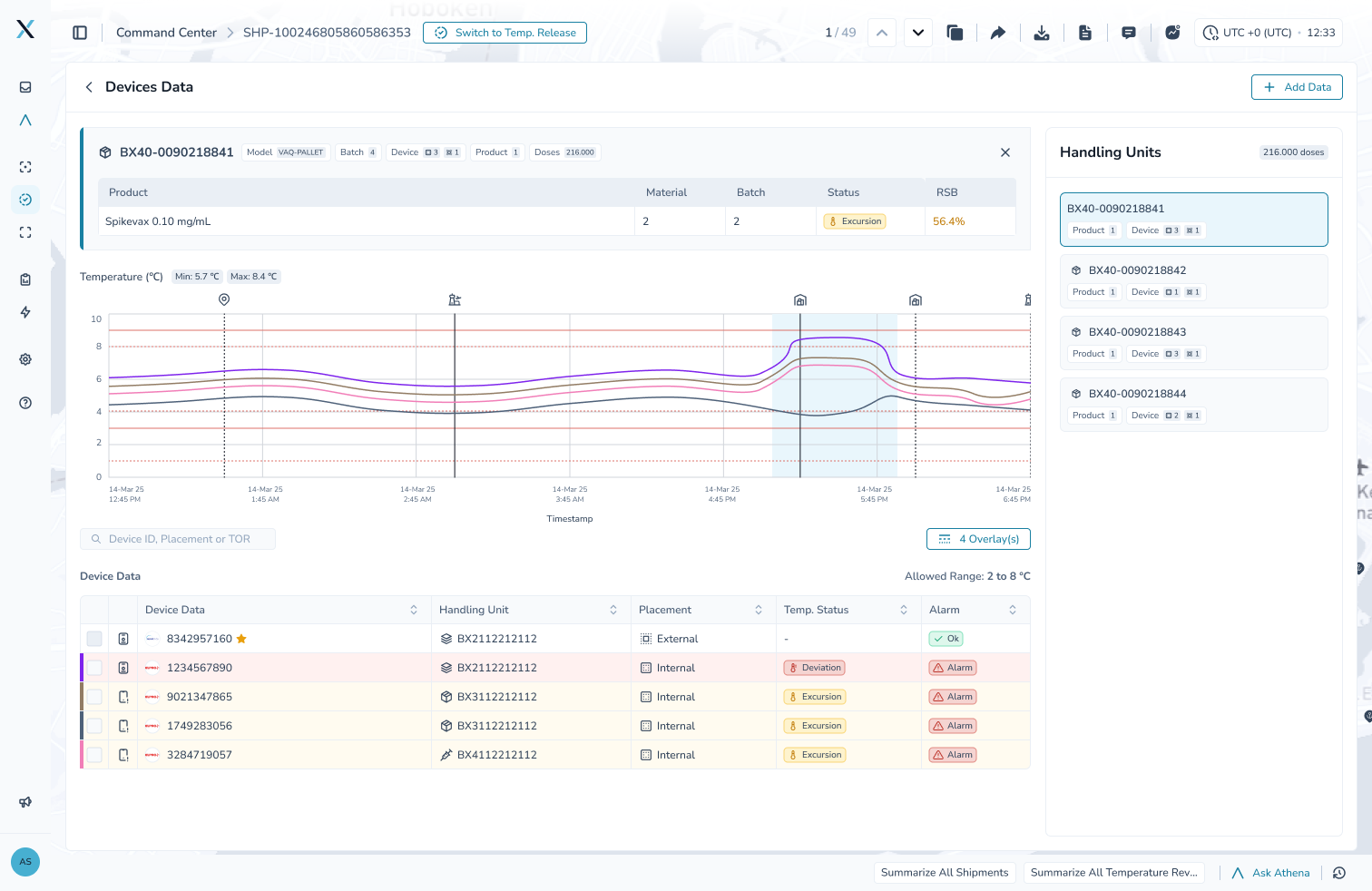
Devices. The Devices Data page is organized around handling units, the pallets and boxes a shipment is made of. Every device is tied to its product, its batch and its remaining stability budget (RSB), so a reading is never just a number.
What we learned
Ship the vocabulary. On-Track, handling unit and remaining stability budget did more for clarity than any layout decision. Once a team shares the words, the screens need less explaining, and we could remove copy from the page rather than add it.
Test with real shipments, not tidy ones. Every layout looks calm with sample data. Real shipments arrive with missing milestones, silent devices and excursions that started before anyone was watching. Those are the cases the design has to hold up in, and most of our late changes came from sitting with messy shipments rather than reviewing mockups.
A redesign should not take the product apart to its atoms. We kept the map, the timeline, the device chart and the vocabulary people already knew, and changed how they are arranged and who does the first read. The page is new. The platform is the one you already trust.
Where to go from here
Open a shipment you know well and read the Live Risk band first. Check whether you agree with the verdict and the recommended action. When you do not, tell us. That feedback is what sharpens the agent.
Full details are in the CONTXT v3.0 release notes.