Understanding Temperature Status vs Release Status
Last updated: May 6, 2026
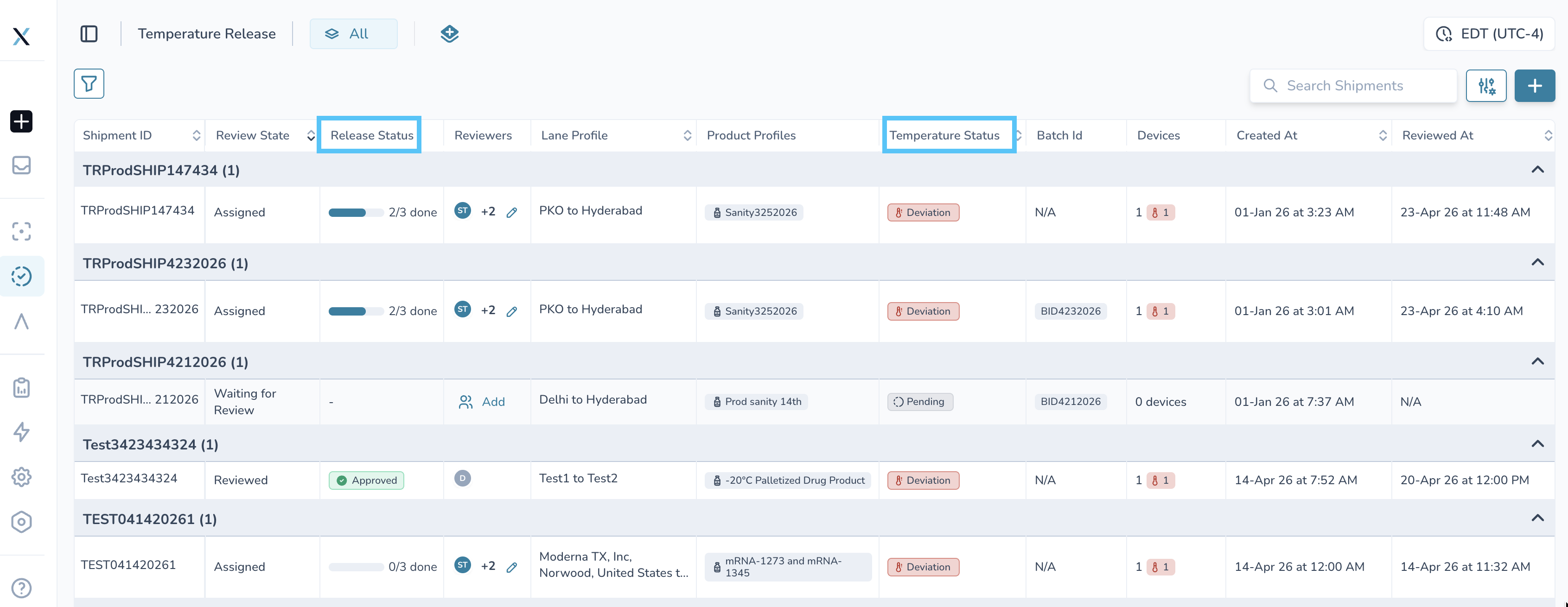
Overview
In the Product Release module, shipments include multiple status columns that serve different purposes.
The most commonly confused are:
Temperature Status
Release Status
Review State
Each answers a different question about the shipment.
The Key Difference
Temperature Status tells you the temperature status of the shipment.
Release Status tells you what was decided on the shipment.
Temperature Status
What it represents
Temperature Status reflects the temperature performance of the shipment based on recorded data.
What it answers
Did the shipment stay within range?
Were there any excursions?
Is the product considered stable?
Example statuses
In Range
Excursion Detected
Out of Range
Important note
Temperature Status is data-driven.
It is automatically calculated based on sensor readings and product profile rules.
Release Status
What it represents
Release Status reflects the final decision made about the shipment.
What it answers
Was the shipment approved?
Was it rejected or quarantined?
Is it still pending a decision?
Example statuses
Approved
Rejected
Pending
Important note
Release Status is decision-driven.
It is set by a user or workflow after reviewing the shipment.
Review State
What it represents
Review State shows where the shipment is in the review process.
What it answers
Has the shipment been reviewed yet?
Is it currently under review?
Example states
Not Reviewed
In Review
Reviewed
How These Work Together
These three fields are independent but related.
Field | Purpose |
|---|---|
Temperature Status | What happened during transit |
Review State | Whether someone has reviewed it |
Release Status | The final decision made |
Example Scenarios
Scenario 1: Excursion, Pending Review
Temperature Status: Excursion Detected
Review State: In Review
Release Status: Pending
👉 The shipment had an issue and is still being evaluated.
Scenario 2: Excursion, Approved
Temperature Status: Excursion Detected
Review State: Reviewed and within Stability Budget
Release Status: Approved
👉 The shipment had an excursion, but it was reviewed and deemed acceptable.
Scenario 3: No Issues, Not Reviewed
Temperature Status: In Range
Review State: Not Reviewed
Release Status: Pending
👉 No issues detected, but no decision has been made yet.
Why This Matters
Understanding the difference between these statuses helps you:
Avoid confusion when values don’t match
Make informed release decisions
Maintain clear audit trails for compliance
Each field plays a distinct role in the shipment evaluation process.