Changelog: CONTXT v2.3
Last updated: February 24, 2026
Released February 26, 2026 (target)
This release focuses on clearer access controls, more reliable search and filtering, and a better experience in Temperature Release and workflow history. You get safer defaults for new user groups, correct shipment visibility by role, and several fixes for Temperature Release views and exports.
🆕 What's New
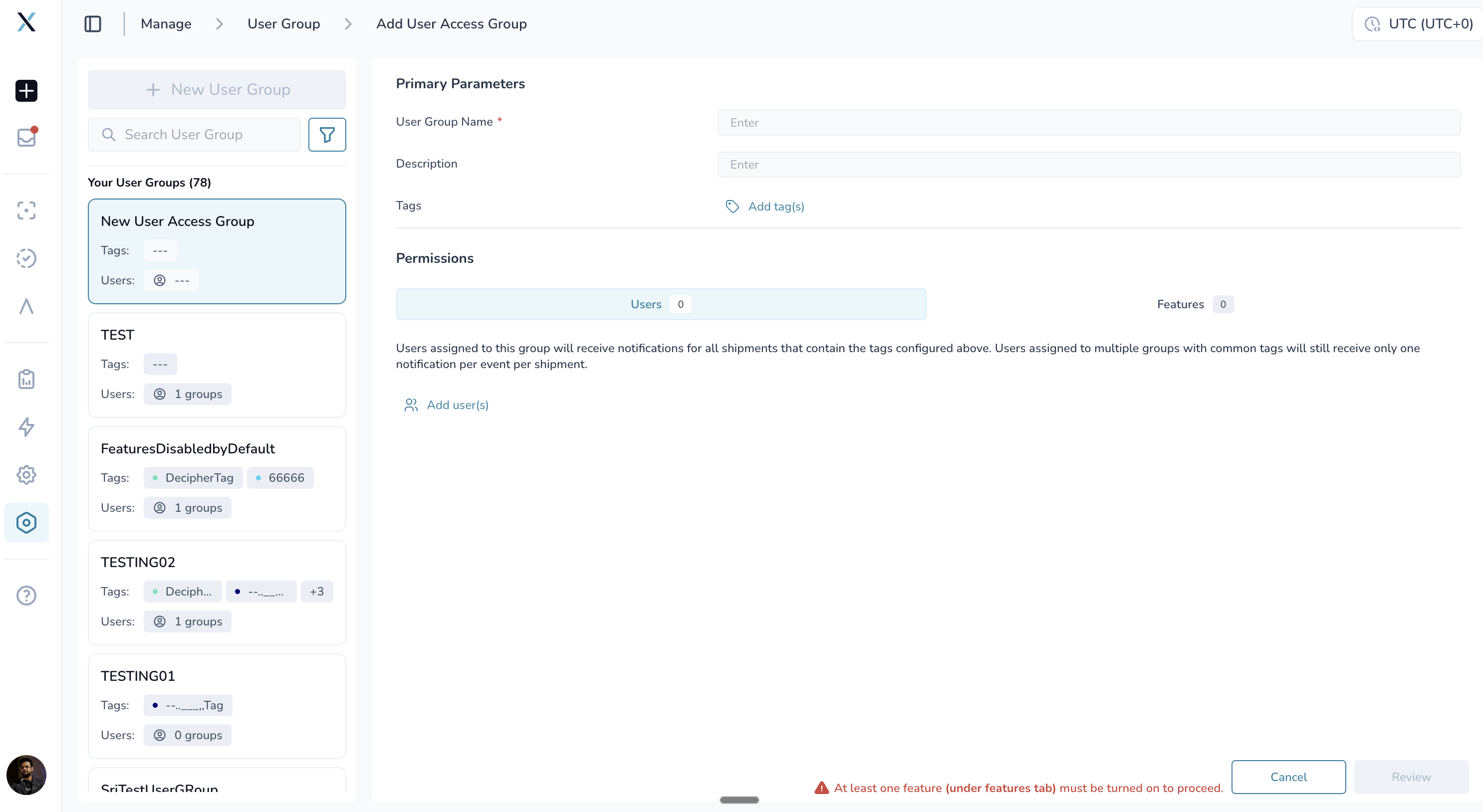
New User Access Groups Start with Features Turned Off
When you create a new user access group, all features are now off by default. You choose which capabilities to turn on (Command Center, Temperature Release, Workflow Builder, and so on), and you must enable at least one feature before you can save the group.
When we add new features to the platform, they will also be off by default for existing user access groups until an admin turns them on. This keeps access predictable and avoids accidentally exposing new capabilities before you’re ready.
Why this matters: You control exactly who can see and use which parts of CONTXT. New groups and new features no longer default to “everything on,” so you can roll out access step by step.
Shipment Search Matches Your Access
Shipment search (global search and list views) now respects your user access group correctly. If you were previously missing shipments you should see, or seeing ones you shouldn’t, because of how roles and groups are set up, this release fixes that behavior so results match your permissions.
Why this matters: You get accurate, consistent shipment lists and search results based on your role and access, especially in organizations with multiple user types (e.g. commercial vs member, or different business units).
Temperature Release: Reviewer Views and “Load More”
Two important fixes in Temperature Release:
Reviewer-based views – When you filter a view by reviewer (e.g. by workflow), the list now shows results by the selected reviewer instead of mixing in duplicate rows by shipment. You get a clear, correct list per reviewer.
Load More – For lists longer than 50 shipments, “Load More” now correctly loads the next page instead of stopping after the first page.
Why this matters: Reviewer-focused workflows and large queues are usable without wrong or missing data.
Temperature Release: Tags Dropdown and CSV Export with Date Filters
Tags dropdown – The Add Tags area in Temperature Release shipment edit no longer gets cut off by the preview panel. The tags list and sub-tags are fully visible and selectable.
CSV export with date filters – If you save a view that uses a date range (e.g. shipment created or completed date), downloading CSV for that view now works instead of failing.
Why this matters: You can assign and change tags without layout issues, and export date-filtered Temperature Release data for reporting.
One Activity Record When You Update Tags on Profiles
When you change tags on a Product Profile or Lane Profile, the activity history now shows one update instead of two entries for the same change. The audit trail stays accurate and easier to read.
Why this matters: Compliance and internal reviews can rely on a single, clear record per tag update.
Clearer Date Selection in Filters
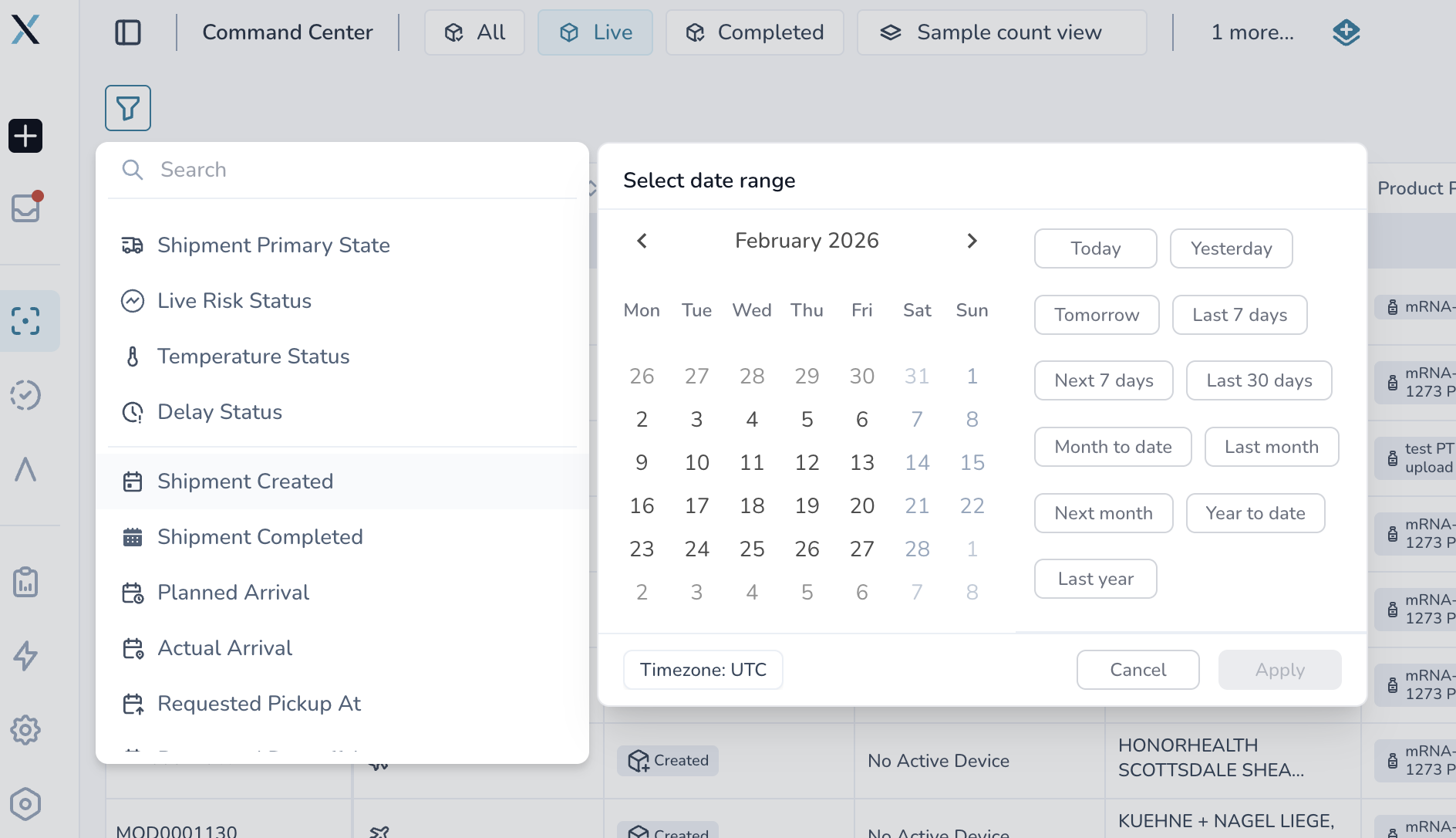
Date filters (including in workflow history) now use a single, consistent date picker. Preset ranges like “this month” or “this year” and custom date ranges are in one place, so you don’t see duplicate or conflicting options. After you pick a custom date range, the calendar popup closes as expected.
Why this matters: Choosing “when” for filters and reports is straightforward and behaves the same across the app.
Temperature Release: Clear Status for Zip Uploads
When you upload a zip file for passive logger temperature data in Temperature Release, you can still include any file types (e.g. PDF, XLSX, PNG).
The system now distinguishes upload from parsing: files that are uploaded but not parsed (such as PNG images) show “successfully uploaded” rather than “successfully parsed.” Temperature data formats (e.g. PDF, XLSX) continue to be parsed as before.
Why this matters: You can see at a glance which files were actually parsed for temperature data and which were only uploaded, so you’re not left wondering if unsupported file types were incorrectly treated as parsed.
🎨 Improved Experience
Workflow History Filters
Custom date range – After you choose a custom date range, the date picker popup closes so the screen is less cluttered.
Accurate Status When Shipments Arrive
When a shipment reaches its destination, the system now updates its status correctly so that predicted delay is cleared when the shipment is actually on time or early. Predicted arrival (PTA) calculations also stop after the shipment is at destination, so you don’t see outdated predictions. Follow-up work continues for edge cases where a shipment arrived early but still showed as “off track.”
Inbox and Notifications
Inbox messaging for Temperature Release and Command Center shipments has been verified so you receive expected notifications for the right shipments.
🆘 Need Help?
User access groups or feature flags? Contact your admin or Customer Success Manager.
Temperature Release views or CSV export? Check that your view filters (including date range) are saved, then try the download again.
Search or permissions? If you still don’t see expected shipments, confirm your user access group and feature access with your admin.
Technical or integration issues? Submit a support ticket through your usual channel.
Thank you for using CONTXT. We’re committed to giving you accurate, role-based visibility and a reliable experience across Command Center and Temperature Release.