Changelog: CONTXT v1.0.4
Last updated: December 3, 2025
Released August 21, 2025
We're excited to share the latest major release of Command Center, delivering comprehensive enhancements across temperature monitoring, document management, integration reliability, and user experience. This release represents one of our most significant updates with 45+ improvements and new features.
 What's New
Enhanced Temperature Chart Experience 
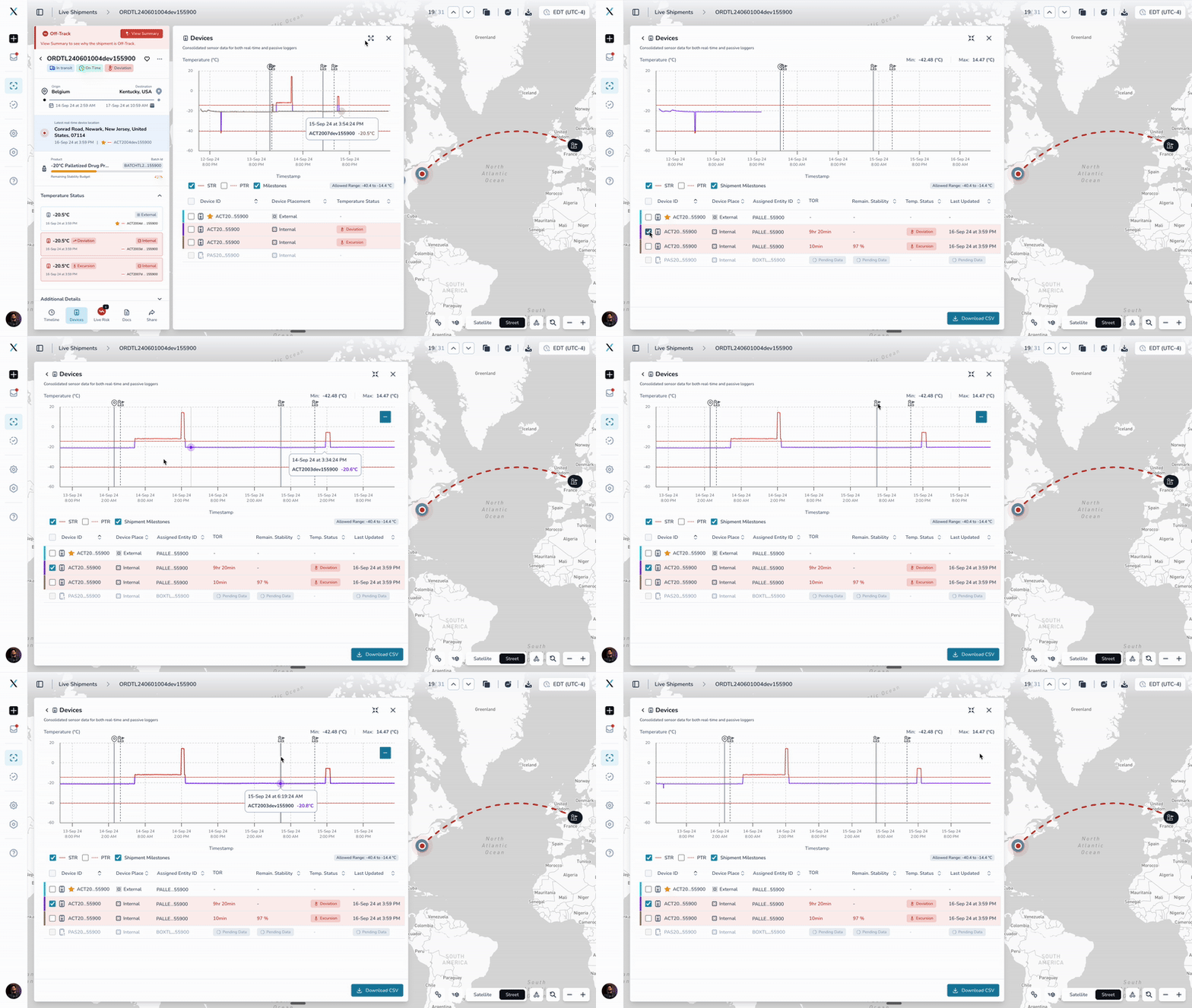
Professional-grade charts with timeline context and expanded views
Shipment timeline overlay: Temperature charts now display shipment milestones as vertical lines, showing origin departure, stop entries/exits, and destination arrival directly on temperature data
Expandable chart view: New expand icon allows full-screen temperature analysis with additional device columns (Assigned Entity, Remaining Stability Budget)
HighCharts integration: Migrated from ReCharts to HighCharts for better performance, professional PDF reports, and handling of large datasets (50,000+ data points)
Interactive timeline toggle: Users can show/hide timeline events to focus on temperature data or correlate with shipment progress
Why this matters: Provides complete context for temperature events by showing exactly what was happening in the shipment journey when temperature deviations occurred.
Document Upload Notification System
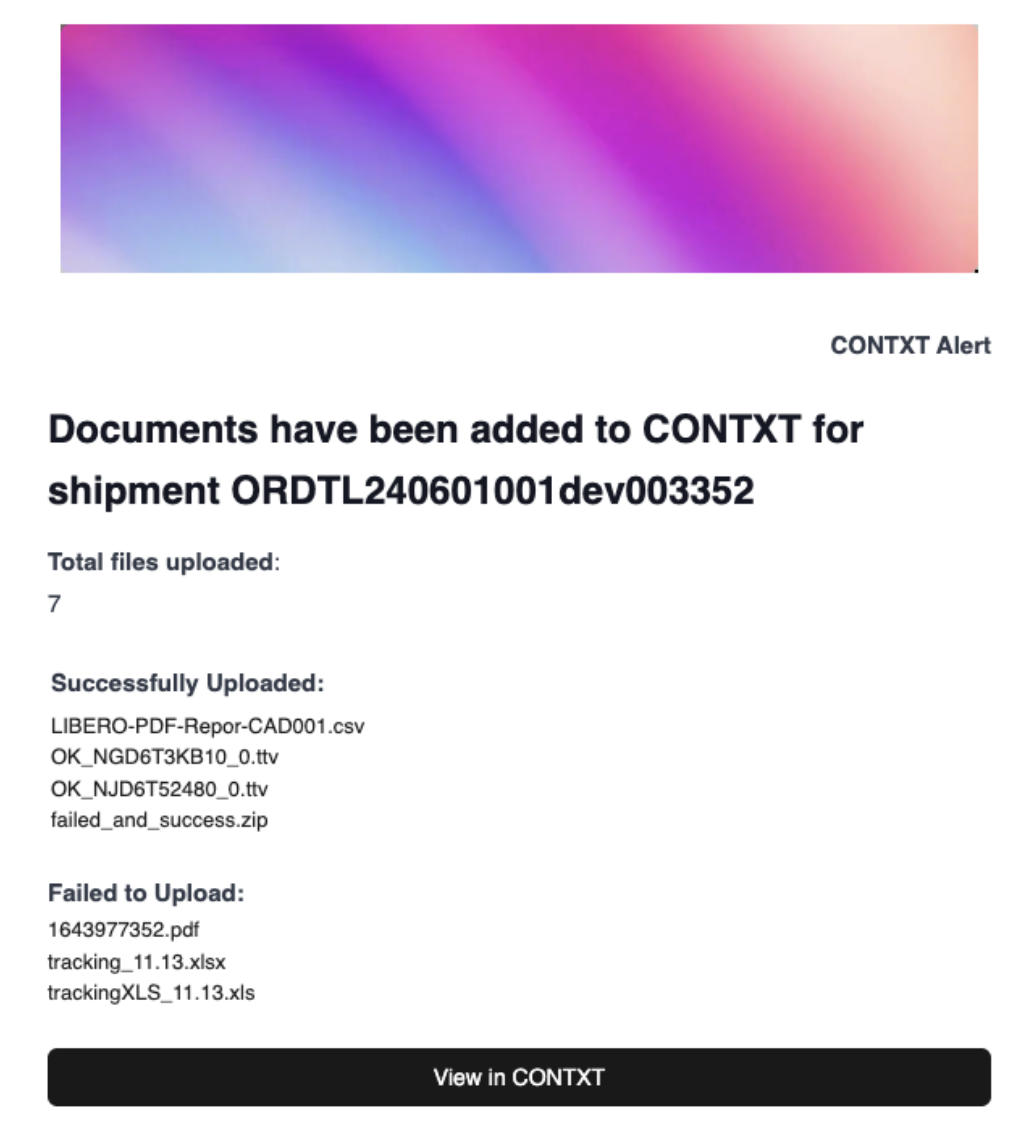
Complete notification system for document management
Smart upload notifications: Automatic email and in-app notifications when documents are successfully parsed or fail processing. (In-app notification is subscribed by default for all users, additionally you can subscribe for email notification from personal notification preference setting tab)
Batch upload summaries: Single notification for multiple file uploads showing total files, successful uploads, and failed files
Direct access links: Notifications include direct links to view uploaded documents in Command Center
Template customization: Professional email templates with shipment-specific information and file processing status
Why this matters: Eliminates uncertainty about document upload status and provides immediate feedback on file processing success or failures.
Quick Download Access
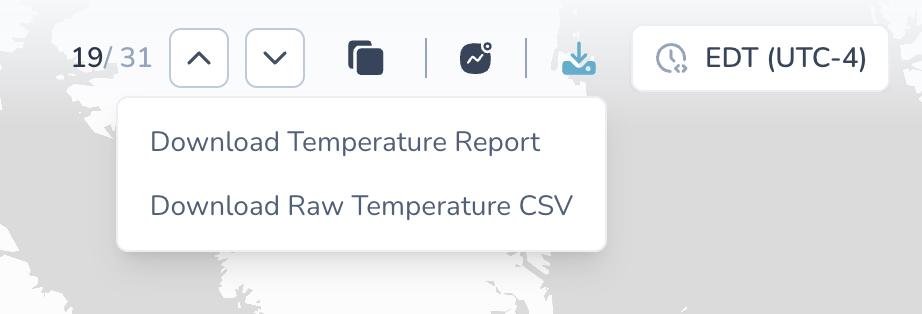
Convenient download options from shipment details page
Download shortcut button: New download icon in shipment header provides quick access to temperature reports and raw data
Dual download options: Temperature report (professional PDF) and raw temperature CSV (zip file with all device data)
One-click access: No need to navigate to devices tab for common download operations
Tooltip guidance: Clear indicators for available download options
Why this matters: Streamlines the most common user actions - accessing temperature reports and raw data for analysis and compliance.
Enhanced Carrier Tracking Number Support
Support for shared tracking numbers across multiple shipments
Multiple orders per tracking number: Command Center now handles cases where carriers assign the same tracking number to multiple separate shipments
Improved data consistency: All shipments sharing a tracking number now receive complete device data, flight information, and milestone updates
Seamless integration workflow: K+N WMS and QuickStat integrations automatically handle duplicate tracking numbers without data conflicts
Eliminated data gaps: Fixed QuickStat integration issue where only the first matching shipment would receive updates, leaving other shipments with incomplete information
Smart Flight Number Processing
Automatic cleanup of duplicate airline codes in flight data
Intelligent deduplication: System automatically detects when flight numbers already contain airline codes (e.g., "AF1401" instead of "AFAF1401")
IATA code validation: Enhanced validation ensures only properly formatted airline codes (2-3 alphabetic characters) are processed
Accurate flight tracking: QuickStat integration now processes flight information correctly, preventing malformed flight numbers
Better milestone accuracy: Cleaner flight data improves shipment tracking and milestone updates
 Improved Experience
Advanced Temperature Analysis
Timeline correlation: Easily correlate temperature events with shipment milestones using visual timeline overlay
Expanded view mode: Full-screen charts for detailed analysis of large datasets
Professional reporting: HighCharts-generated PDF reports with better formatting and visual clarity
Stability budget tracking: View remaining product stability budget directly in expanded device tables
Better Default Settings
Updated arrival predictions: Default business hours changed from 9-5 to 8-5 for more accurate predicted time of arrival (PTA) calculations
Consistent product displays: Product stability temperature ranges now appear in the same order across all screens - product profiles, device tabs, and live risk events
Automatic application: Lanes without defined destination business hours now automatically use 8-5 local time for PTA calculations and pre-arrival notifications
Streamlined User Interface
Download shortcuts: Quick access to temperature reports and raw data from shipment header
Notification management: Fixed notification templates to prevent unregistered users from receiving emails
Error handling improvements: Better handling of large datasets and edge cases in temperature chart display
Warning notifications: Proper alerts when navigating away from unsaved configuration changes
 Behind the Scenes
Critical Bug Fixes
Document upload integration: Fixed workflow configuration issue blocking K+N document retrieval for Moderna
Temperature chart stability: Resolved maximum call stack errors when loading large datasets (50,000+ temperature readings)
Report generation: Fixed download errors for shipments without devices or device data
Chart performance: Enhanced memory management and rendering for temperature charts with massive datasets
Destination arrival notification: Fixed the "actual arrival time" bug that was showing last recorded PTA instead of the actual destination arrival time
System Infrastructure Improvements
Database optimization: Removed UNIQUE constraint on carrier_tracking_number to support complex carrier relationships
Integration flow enhancements: All major integrations (K+N WMS, QuickStat, SmartSheet) now use consistent logic for handling carrier tracking numbers
Device mapping synchronization: Added database triggers to keep device mappings in sync when shipment devices are edited or removed
Performance monitoring: Enhanced logging and validation for better troubleshooting and system visibility
 Getting Started
These improvements are automatically available in your Command Center dashboard. No action is required on your part.
New Temperature Chart Features:
Navigate to any shipment's Devices tab
Use the timeline toggle to overlay shipment events on temperature data
Click the expand icon (next to the X) for full-screen analysis
Use the new download shortcut in the shipment header for quick report access
Document Upload Notifications:
You'll now receive email confirmations when documents are uploaded and processed
Failed uploads will be clearly identified with specific file names
Click notification links to go directly to the uploaded documents
For customers using K+N or QuickStat integrations:
Existing shipments with shared tracking numbers will now receive complete data updates
New shipments will automatically benefit from improved tracking number handling
Flight information will display correctly without duplicate airline codes
Lane profile associations have been validated and corrected where necessary
 Tips & Best Practices
 Make the most of enhanced temperature charts:
Use timeline overlay to identify exactly when temperature events occurred relative to shipment milestones
Switch to expanded view for detailed analysis of shipments with multiple devices or large datasets
Generate PDF reports using the new HighCharts system for professional documentation
Monitor remaining stability budget in expanded view for critical shipments
 Optimize document management:
Watch for upload notification emails to confirm document processing status
Use direct links in notifications to quickly access uploaded documents
Monitor failed upload notifications to address document format issues
 Important for integration users:
Shared carrier tracking numbers are now fully supported across all shipments
Flight information is automatically cleaned for accurate tracking
Document upload notifications are working correctly for all integration flows
 Need Help?
Temperature chart questions? Contact your Customer Success Manager for guidance on using the new timeline overlay and expanded view features
Document upload issues? Check in-app notification for upload status or submit a support ticket
Integration questions? Reach out for assistance with carrier tracking number scenarios or flight data processing
Download problems? Use the new shortcut button in the shipment header or contact support for assistance
Feature requests? Share your feedback through the in-app feedback tool
Thank you for using Command Center. We're committed to continuously improving your logistics management experience with robust, reliable tools that handle the complexity of modern supply chains while providing the detailed insights you need for operational excellence.