Using Lane Performance Insights
Last updated: July 2, 2026
Overview
Lane Performance Insights gives you a real-time view of how your supply chain is performing.
Included with Command Center, this dashboard automatically analyzes historical and live shipment data to help you identify trends across carriers, lanes, routes, compliance, and device performance.
Access the Dashboard
Open Insights.
Select Lane Performance.
Dashboard Views
Global Executive
Use this view for an overall picture of your supply chain.
Includes:
Shipment volume
Live Risk
Temperature impact
Carrier volume
On-time delivery trends
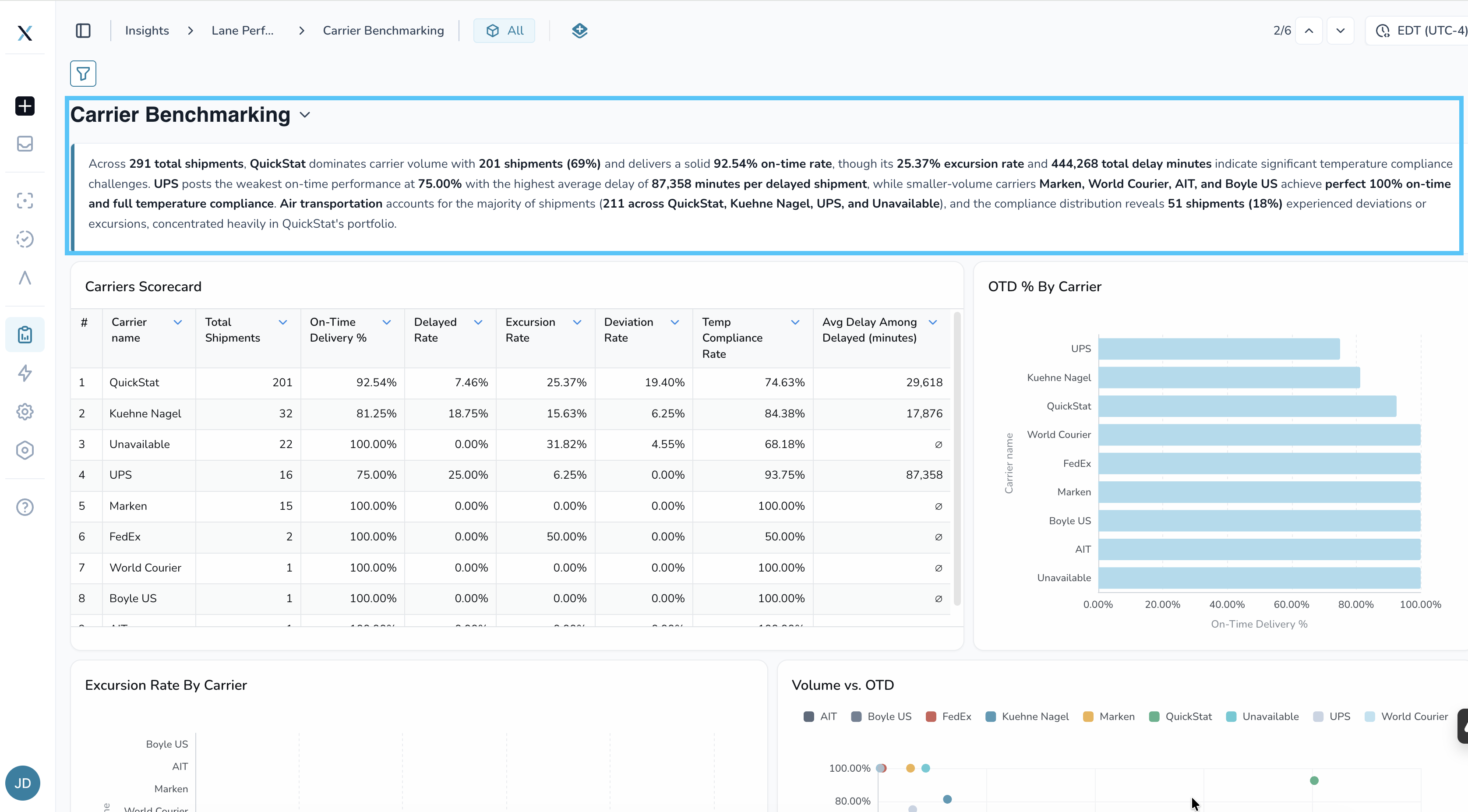
Carrier Benchmarking
Compare carrier performance.
Metrics include:
Carrier scorecards
On-time delivery
Excursion rate
Shipment volume
Compliance
Waypoint Hotspot
Identify locations creating delays.
Displays:
Most visited locations
Excursions
Average dwell time
Airport comparisons
Deviation & Compliance
Review temperature performance across your network.
Includes:
Excursions
Compliance trends
Deviation analysis
IoT Performance
Monitor device health.
Includes:
Battery performance
Connectivity
Provider comparisons
Transport mode performance
CO₂ Emissions
Estimate transportation emissions while viewing the methodology used to calculate them.
AI Summaries
Every dashboard automatically generates an AI summary.
As filters change, the summary updates to match the data currently displayed.
Best Practices
Begin with the Global Executive view.
Read the AI summary before reviewing charts.
Apply filters to narrow your analysis.
Compare carriers regularly to identify improvement opportunities.
FAQ
How often does the dashboard refresh?
Approximately every five minutes.
Do historical shipments appear?
Yes. Historical shipment data is automatically included.
Best Practices
Get the most value from Lane Performance Insights with these recommendations:
Start with the Global Executive view for a high-level overview of your network.
Apply filters before reviewing the AI summary so insights reflect the data you're analyzing.
Compare trends over time rather than relying on a single snapshot.
Use Carrier Benchmarking to prepare for Quarterly Business Reviews (QBRs).
Review Waypoint Hotspot regularly to identify recurring delays and bottlenecks.
Monitor IoT Performance to proactively identify connectivity or battery issues before they impact shipment visibility.
Related Articles
Need Help?
If you have questions about Lane Performance Insights or need assistance interpreting your data, contact your Customer Success Manager or submit a support ticket through the Help Center.