Changelog: CONTXT v1.0.5
Last updated: December 3, 2025
Released August 29, 2025
We're excited to share the latest enhancements to Command Center, focused on delivering advanced route visualization and improved system reliability across all your logistics operations.
 What's New
Enhanced Route Visualization with Interactive Events 
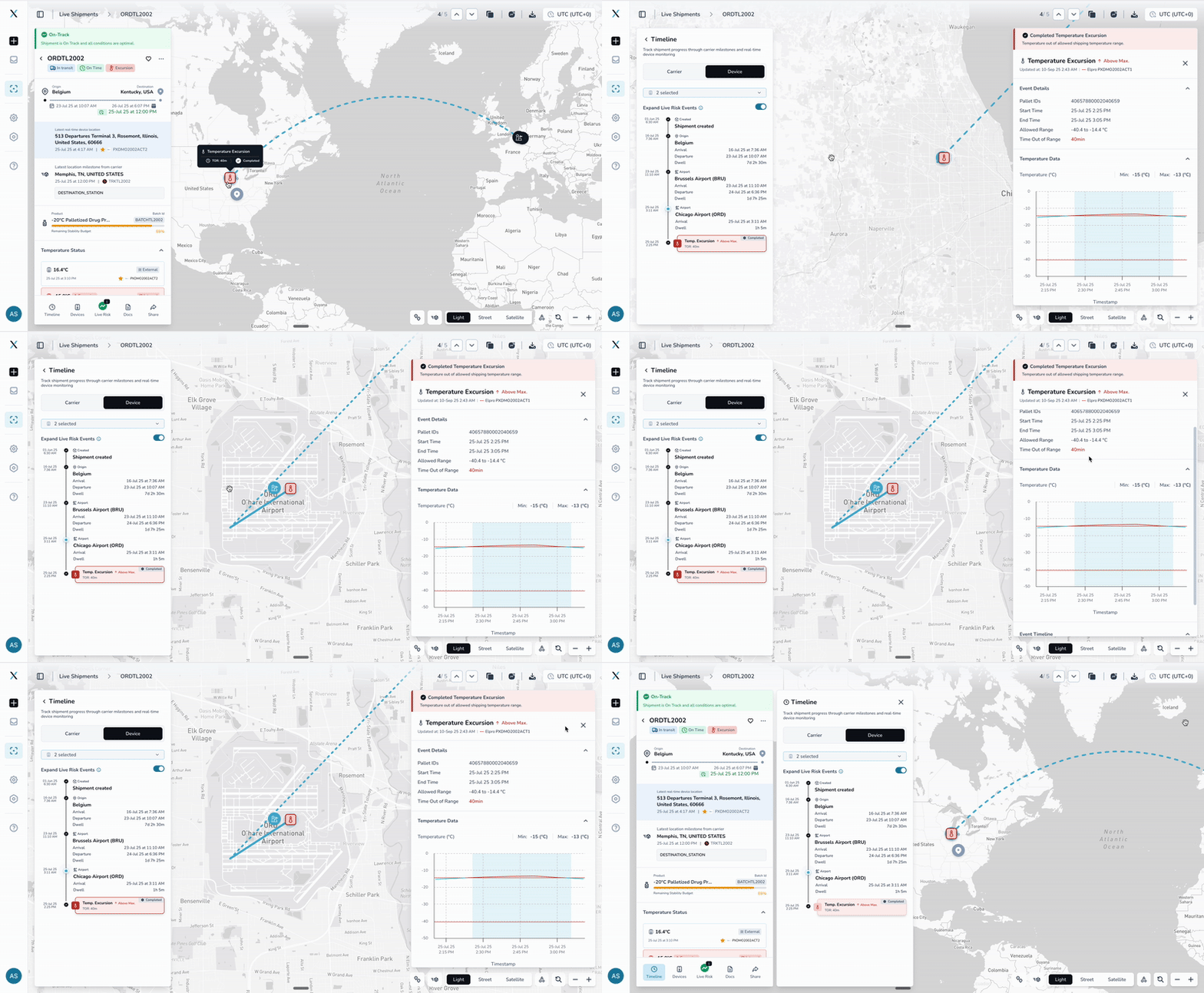
Get clearer insights into your shipment journeys
Unified route display: Routes now show with a single cohesive color instead of confusing multi-colored segments
Interactive live risk events: Live risk events are displayed directly on the route with color-coded status indicators for active and completed events
Better event navigation: Click on any event to automatically zoom and center the map for detailed inspection
Improved device tracking: Enhanced device information display with more accurate location positioning
Why this matters: See the complete picture of your shipment's journey with temperature and other live risk events clearly marked along the route, making it easier to identify issues and understand temperature excursions in geographic context.
Improved PDF Reports and Data Accuracy
More complete and accurate shipment documentation
* Complete device listing: PDF reports now show all devices assigned to a shipment, whether they have data or not. Device detail sheets are generated only for devices with data, while the summary includes all devices.
* Accurate timestamps: Activity history now uses correct shipment creation times instead of database record times
* Fixed product profile display: Product profile information shows proper names instead of technical parameter codes
Complete Support Experience Redesign
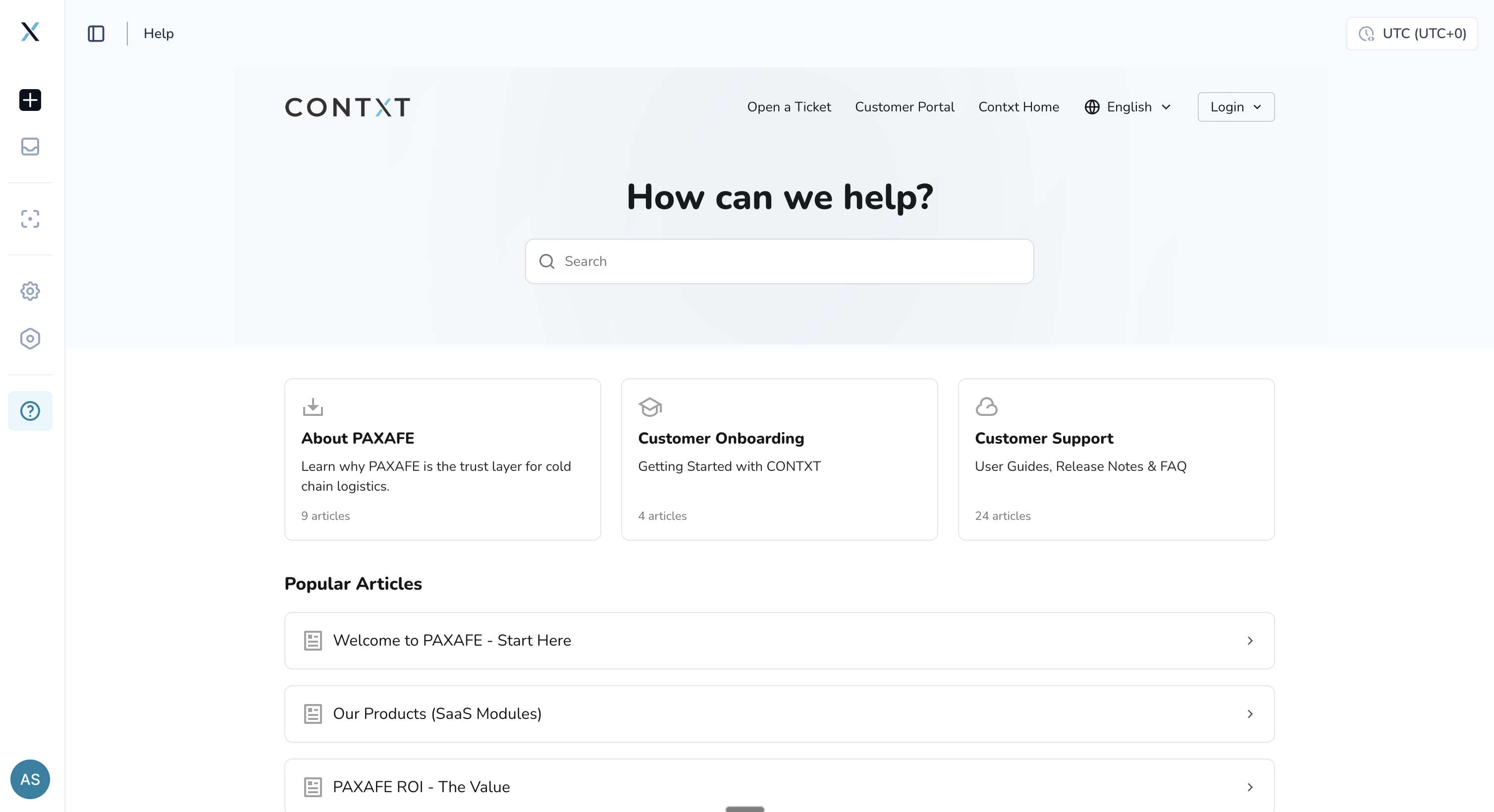
Find answers faster with our intelligent knowledge base
AI-powered search: Type your question naturally and get instant, relevant results with our "Ask AI" feature that understands context and provides precise answers
Comprehensive knowledge structure: Organized into three main sections - About PAXAFE, Customer Onboarding, and Customer Support for easy navigation
Smart search functionality: Advanced search that finds relevant articles, user guides, and FAQs across all content areas
Integrated support ticket system: Submit detailed support requests directly from the help center with rich text formatting and file attachment capabilities
Customer portal access: Track all your support tickets, view response history, and manage your support requests in one centralized location
 Enhanced User Experience
Smarter Chart Interactions
Maintained zoom levels: Temperature chart, remembers your zoom level when you select different events or navigate between data points
Event highlighting: Events are properly highlighted even when they don't have complete timing information
Better map centering: Maps automatically center on relevant content without losing your viewing preferences
Streamlined Workflows
Improved help system: Updated help page links now direct to the comprehensive support portal at [support.paxafe.com]
Enhanced error handling: Better error messages and automatic retry mechanisms reduce system interruptions
 Reliability Improvements
Enhanced Integration Stability
QuickSTAT integration fixes: Resolved issues where some shipments weren't being created from QuickSTAT data, ensuring complete shipment visibility
Improved webhook reliability: Enhanced processing of shipment milestone updates with automatic fallback mechanisms
Data Consistency Enhancements
Accurate activity timestamps: Fixed discrepancies between displayed creation times and actual shipment timeline events
Notification reliability: Resolved issues where some team members weren't receiving notifications after being added to user groups
Complete audit trails: All user actions and system changes are now properly captured in the audit history
 Getting Started
These improvements are automatically available in your Command Center dashboard. No action is required on your part.
Using the Enhanced Route Visualization:
1. Navigate to any shipment's timeline or live risk view
2. Route paths now display with unified coloring and interactive live risk events
3. Click on any live risk event to zoom in and see detailed information
4. Use the device location toggle to show/hide additional device positions
 Tips & Best Practices
 Optimize your route analysis:
Click on temperature events along the route to understand the geographic context of temperature changes
Use the unified route coloring to follow the complete shipment path easily
Toggle device locations on/off to focus on the route path or see all device positions as needed
 Need Help?
Questions about the new features? Contact your Customer Success Manager for training and best practices guidance
Technical issues? Submit a support ticket through the updated help desk at [support.paxafe.com]
Feature requests? Share your feedback through the in-app feedback tool
Thank you for using Command Center. We're committed to continuously improving your logistics management experience with powerful, compliant, and user-friendly tools that grow with your business needs.