Changelog: CONTXT v1.2.3
Last updated: December 19, 2025
Released December 18, 2025
We’re excited to share the latest improvements to CONTXT, focused on giving you smarter shipment insights, more flexible quality review workflows, and enhanced system stability.
🆕 What’s New
AI-Powered Live Risk Summaries ⭐
Instant, contextual insights that explain why shipments need attention
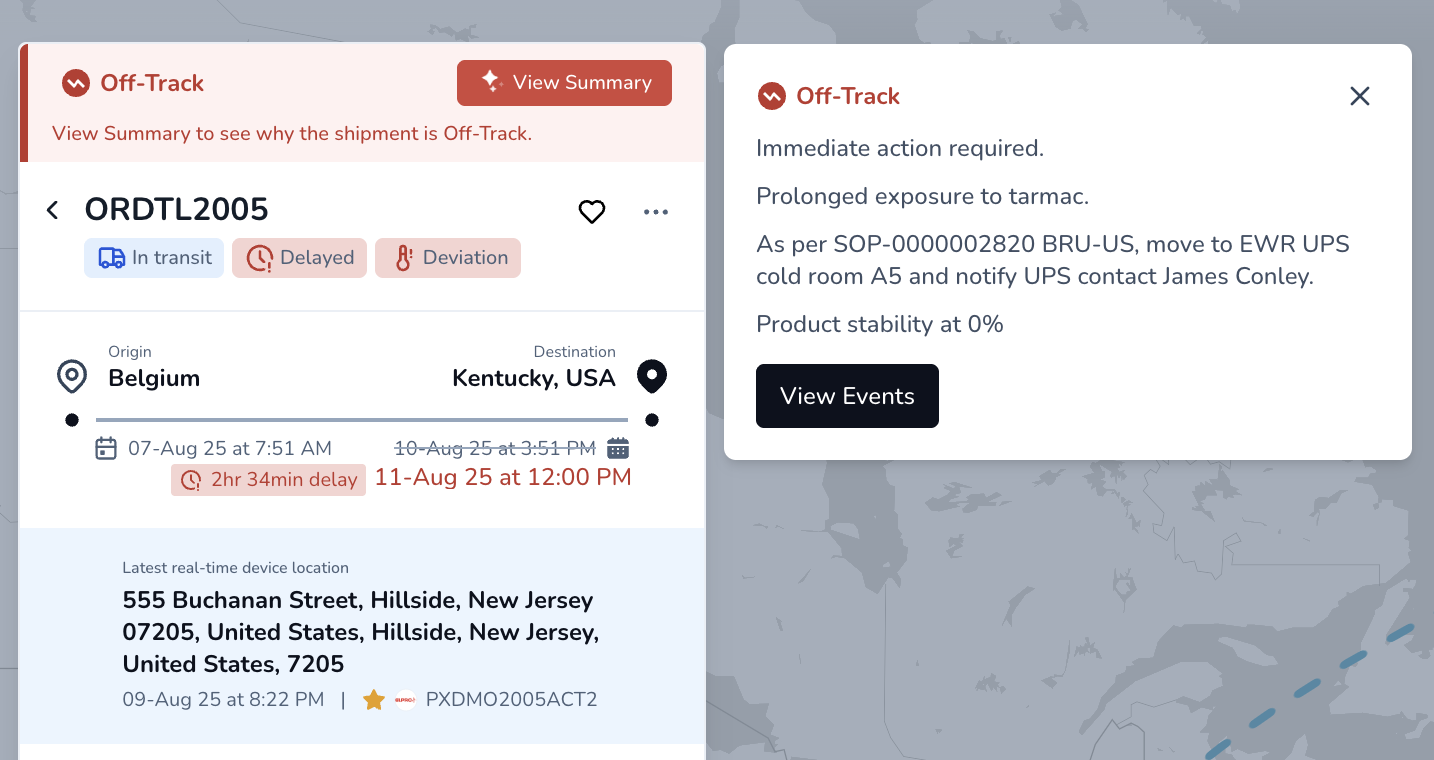
Intelligent explanations: Instead of seeing just “Off-Track,” you now get specific context like “This shipment is predicted to arrive 6 hours later than planned due to extended dwell time at Chicago hub. Temperature has remained stable within acceptable range.”
Dynamic updates: Summaries automatically refresh when new device data arrives, keeping you informed of changing conditions
Fast performance: Smart caching ensures summaries load instantly when you click “View Summary” without waiting for regeneration
Actionable insights: Understand at a glance what’s driving risk - whether it’s predicted delays, temperature excursions, or device health issues
Why this matters: Reduce time spent investigating alerts by getting clear, contextual explanations instantly. Make confident decisions faster without needing to dig through multiple data points.
Enhanced Temperature Release Reviewer Workflow ⭐
Greater flexibility for quality assurance review processes
Multiple reviews by the same reviewer: You can now assign the same reviewer to a shipment more than once. This makes it easier to support workflows where an automated check is followed by a manual review, or when a shipment needs to be revisited after new data becomes available.
Complete review history: Full audit trail shows all reviews completed by each user with timestamps and status changes
Clear warnings: When removing the last pending reviewer, you’ll see a clear message that this will mark the shipment as reviewed with the current release status
Why this matters: Handle complex automated workflows more efficiently. When systems flag shipments for review multiple times, your specialized QA team members can handle all reviews without workflow interruptions or unnecessary reassignments.
🎨 Improved Experience
Enhanced System Reliability
Fixed shipment summary errors: Resolved issue where newly created shipments would throw errors when loading the summary view
Lane profile access restored: Fixed API failures that prevented team members from accessing lane profile configurations
🔧 Behind the Scenes
System Improvements
Intelligent caching: Smart system that detects when new device data arrives and only regenerates summaries when needed, saving time and resources
Enhanced data structure: Improved database architecture to support flexible reviewer workflows and maintain complete audit trails
Better error handling: More graceful management of edge cases when accessing shipment data and summaries
🚀 Getting Started
These improvements are automatically available in your CONTXT dashboard. No action is required on your part.
Using AI-Powered Live Risk Summaries:
Navigate to any shipment with a Live Risk status
Click the “View Summary” button to see the AI-generated explanation
Summaries automatically update when new device data arrives
If loading takes longer than expected, you’ll see a retry option
Working with Multiple Reviews:
Assign reviewers as usual in the Temperature Release workflow
The same reviewer can now be added multiple times to handle subsequent reviews
Full review history shows all completed reviews with timestamps
Dashboard displays the most recent reviewer and review status
💡 Tips & Best Practices
🎯 Make the most of AI summaries:
Use summaries for quick triage to identify which shipments need immediate attention
Look for specific details like delay amounts, temperature status, and contributing factors
Compare summaries over time to see how conditions evolve
Click refresh if you want to regenerate after taking corrective action
🔍 Managing review workflows:
Leverage the ability to assign the same expert reviewer for complex cases requiring multiple reviews
Document reasons in review notes when approving or rejecting after multiple reviews
Use the complete review history to track decision-making across automated workflow re-runs
🆘 Need Help?
Questions about AI summaries or review workflows? Contact your Customer Success Manager for guidance
Technical issues? Submit a support ticket through the help desk
Feature requests? Share your feedback through the in-app feedback tool
Your feedback on the new AI summary capabilities will help shape our next release.
Thank you for using CONTXT. We’re committed to continuously improving your cold chain management experience with intelligent, reliable tools.