Changelog: CONTXT v1.2.1
Last updated: December 4, 2025
CONTXT v1.2.1 Release Notes
Released December 4, 2025
We're excited to share major improvements to the Temperature Release reviewer workflow, enhanced data organization, and expanded access controls. This release focuses on streamlining your review process, giving you better visibility into shipment reviews, and providing more flexible configuration management.
🆕 What's New
Simplified Temperature Release Review Workflow ⭐
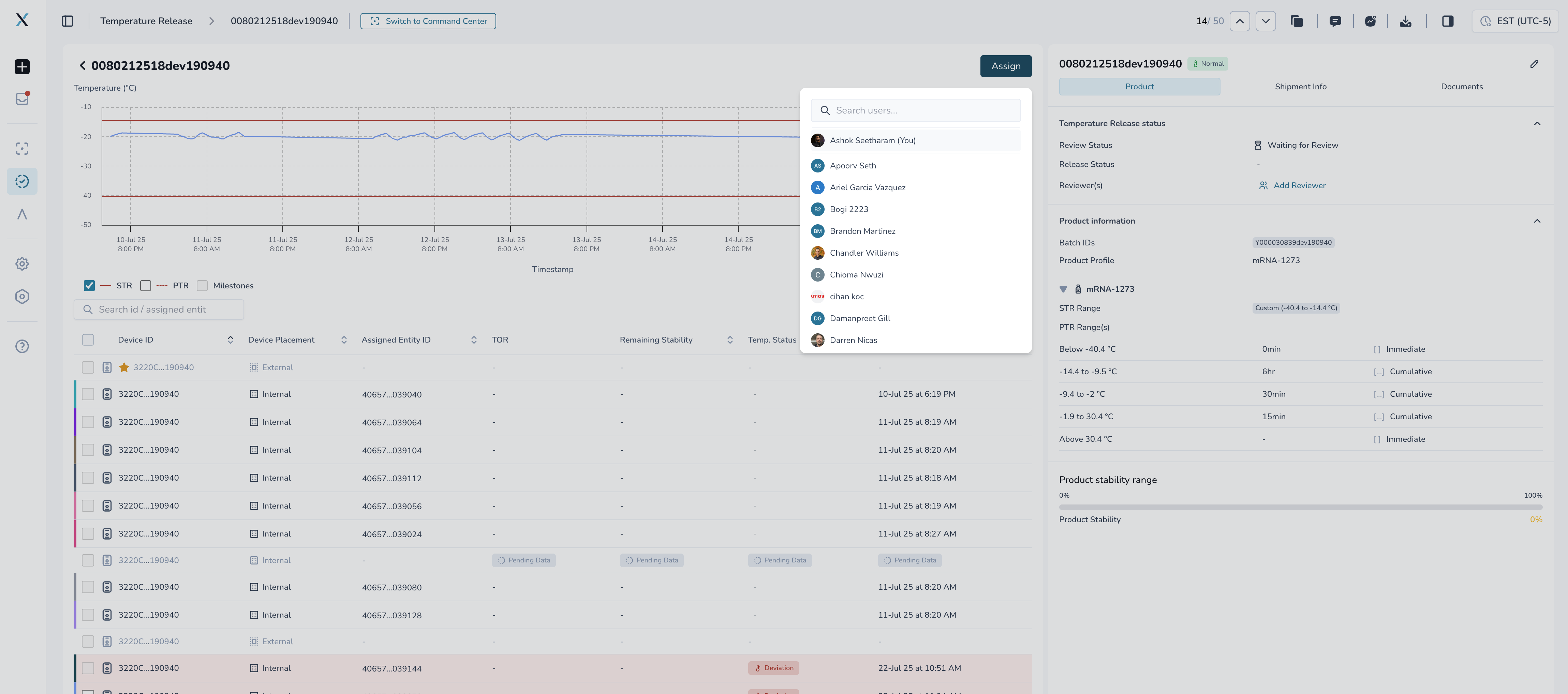
Self-assignment and flexible reviewer management
Direct assignment without extra steps: Click "Assign" to immediately assign yourself or another team member for review - no more "Start Review" button workflow
Any authorized user can start the review: If no specific reviewer is assigned, any member of your User Access Group can assign themselves and begin the review process
Clear assignment visibility: New "Assigned" state (previously "In-Review") makes it immediately clear when a shipment has a reviewer actively working on it
Improved reviewer coordination: See exactly who reviewed a shipment last and what decision they made without opening the shipment details
Why this matters: The previous workflow required starting a review before you could submit it, adding an unnecessary step. Now you can go directly from assignment to submission, cutting down the time it takes to process reviews and eliminating confusion about who's responsible for the next step.
Enhanced Review Visibility with New Dashboard Columns
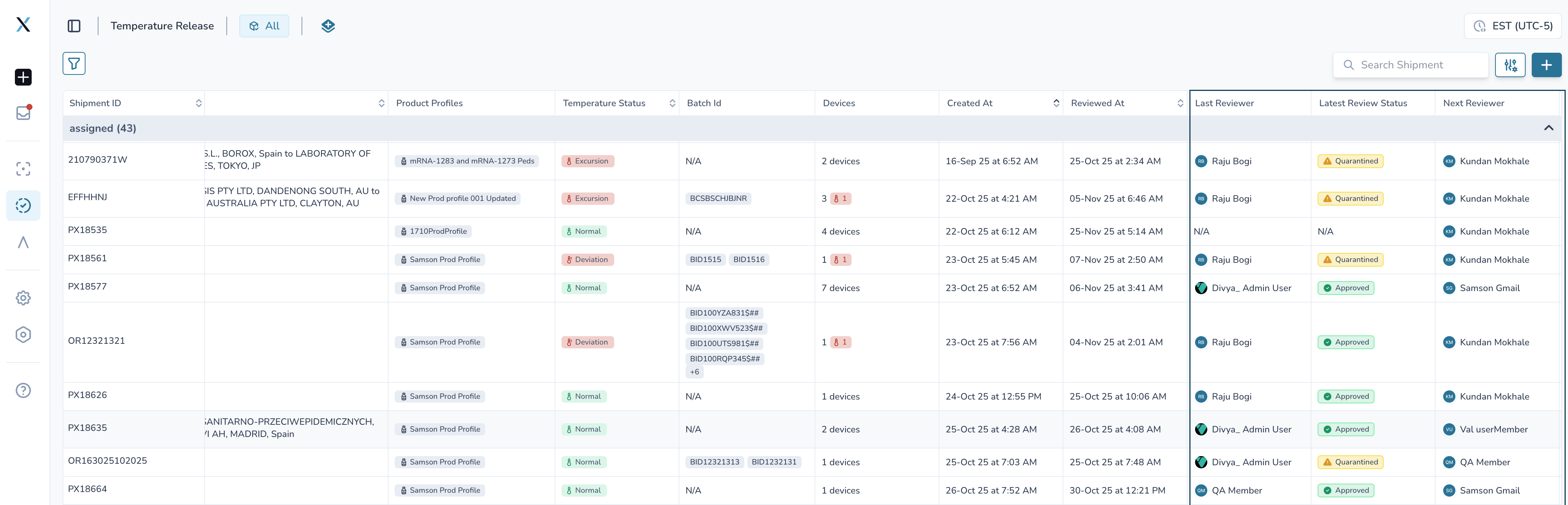
Three new columns provide immediate context on review status
Last Reviewer: Shows the name of the most recent person who submitted a review for this shipment
Next Reviewer: Displays the avatar of the assigned reviewer (visible when shipment is in "Assigned" state)
Latest Review Status: Highlights the most recent review decision (Accept, Quarantine, or Reject) so the next reviewer knows the previous outcome
These columns are enabled by default when using "Review State" grouping and can be shown/hidden for other group options in your display preferences.
Better shipment organization options:
Group by Shipment ID or Order ID: Consolidate multiple products or shipments under the same order for easier review of complex shipments
Within each group: Quickly review temperature data for all products without switching between shipment views
Why this matters: Multi-product shipments and shipments under the same order ID no longer require jumping between different views. The new grouping options and reviewer columns give you all the context you need at a glance, helping you prioritize and process reviews faster.
Streamlined Review State Management
Clearer workflow states from start to finish
"Waiting for Review" state: Shipment needs a reviewer assigned (replaces previous ambiguous states)
"Assigned" state: A specific reviewer is assigned and responsible for the next action (renamed from "In-Review" for clarity)
"Reviewed" state: Review process is complete with a final decision recorded
Simplified assignment process:
When automation runs for a shipment, it leaves the shipment in the "Waiting for Review" state
Any user in the assigned User Access Group (plus admins) can view the shipment and assign themselves or others for review
The assigned user sees the "Submit Review" button enabled immediately - no "Start Review" step required
After submitting a review:
If no new reviewer is assigned, the review process completes, and shipment moves to the "Reviewed" state
If a new reviewer is assigned, they can immediately begin their review
Protected review integrity:
Shipments in "Reviewed" state are now locked from further changes to ensure review decisions remain valid
No new data can be added, devices cannot be added, and shipment edits are restricted once review is complete
Tags can still be updated, as they don't impact the underlying shipment data used for release decisions
Why this matters: The previous "In-Review" state was confusing - users didn't know if a review had actually started or just been assigned. "Assigned" makes it crystal clear that someone is responsible. Locking "Reviewed" shipments prevents accidental changes that could invalidate a completed review.
Immediate Review Context on Shipment Details
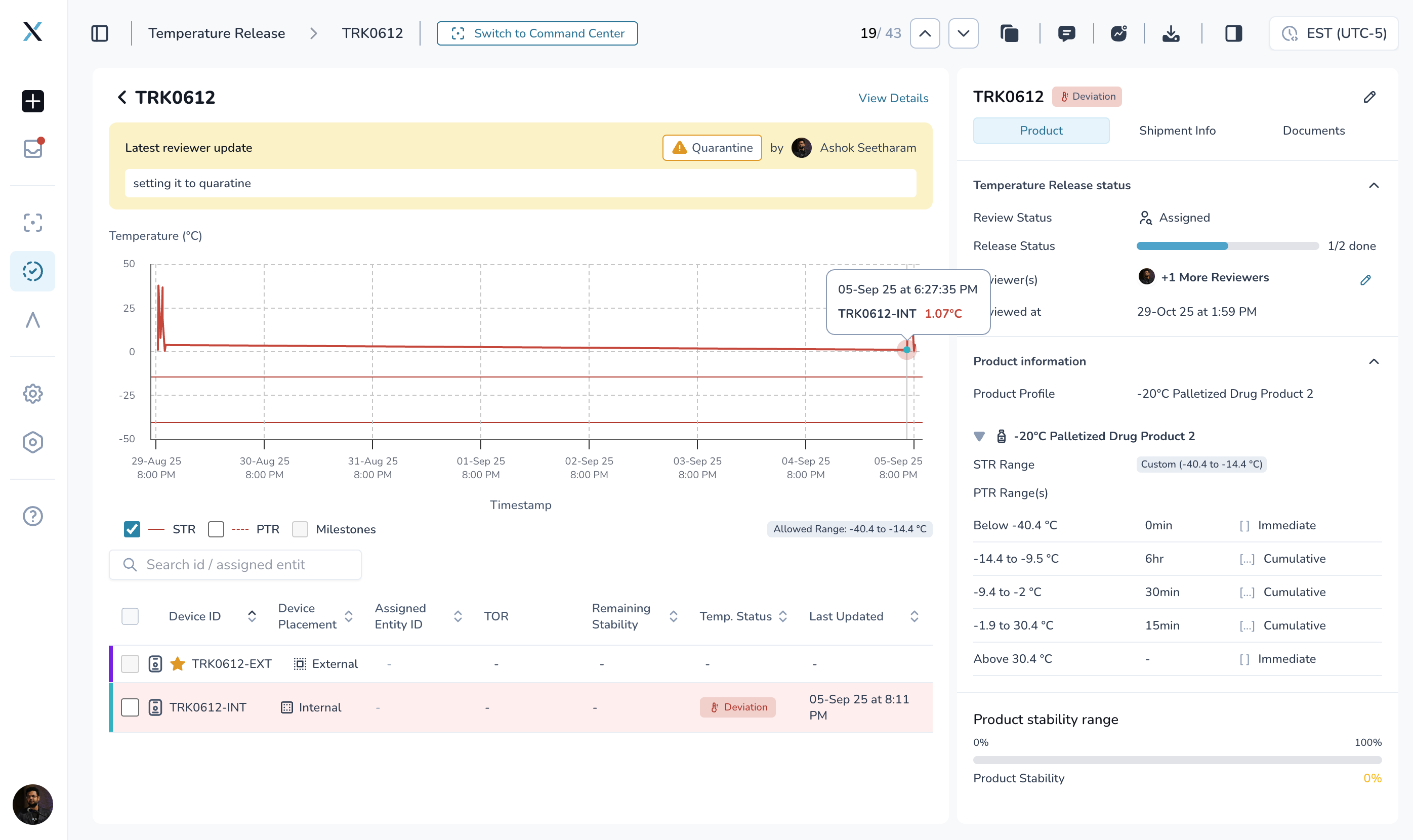
See the review status at a glance
The shipment detail page now highlights the latest release status directly above the temperature graph
Reviewer's notes are displayed prominently to provide immediate context to the next reviewer or anyone viewing the shipment
No need to scroll through audit logs or review history to understand the current situation
Why this matters: When you open a shipment, you immediately see what the last reviewer decided and why. This context is critical for making informed decisions, especially when multiple reviewers are involved in the approval process.
Refined Reviewer Assignment
Assignment list now shows only relevant users
The "Assign Reviewer" and "Add Reviewer" dropdowns are now limited to users within the assigned User Access Group and company admins
No more scrolling through the entire organization to find the right person
All release status options (Accept/Quarantine/Reject) are now available to all reviewers, regardless of their position in the review sequence
Flexible review assignment:
No longer required to follow a set reviewer sequence
Anyone within the User Access Group with the correct permissions can assign a shipment to themselves or others
The order of assignment automatically updates based on who submits reviews
Anyone can assign the shipment to themselves until the review process completes and the shipment is marked as "Reviewed."
Why this matters: The previous system forced you to stick to a pre-defined reviewer order, even when circumstances changed. Now your team has the flexibility to self-organize based on availability and expertise without breaking the review workflow.
🎨 Improved Experience
Flexible Table Sorting
Sort any column directly from the table without changing preferences
Click column headers to sort ascending or descending
No need to navigate to preferences to change which column you're sorting by
All eligible columns now support direct sorting
Improved default sorting logic:
Device column: Now sorts by total device count (not alarm status), with creation date as secondary sort when counts match
Shipment ID grouping: When grouping by Shipment ID, shipments are sorted by creation date within each group for better chronological viewing
Why this matters: The old system required opening preferences every time you wanted to sort by a different column. Now you can quickly reorganize your data with a single click, making it much faster to find what you're looking for.
Granular Configuration Access Control
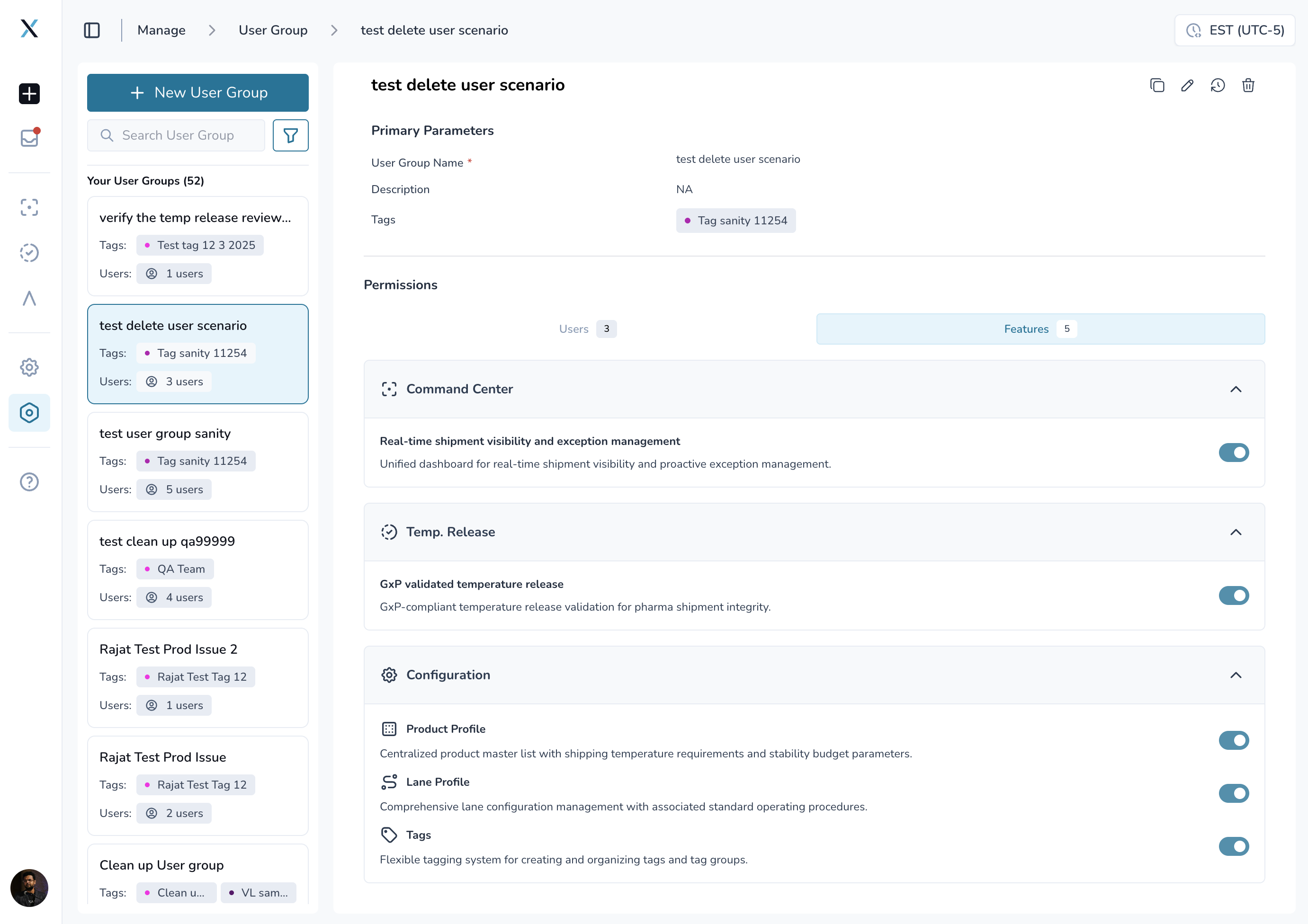
Control which users can access Product Profiles, Lane Profiles, and Tags
New configuration management toggles in User Access Group features
Organizations can now enable/disable access to:
Product Profiles: Centralized product master list with temperature requirements and stability budget parameters
Lane Profiles: Lane configuration management with standard operating procedures
Tags: Flexible tagging system for organizing tags and tag groups
Menu options automatically show/hide based on assigned User Access Group permissions
Similar permission model to Command Center and Temperature Release features
By default, these pages are enabled for all user access groups. Feel free to change the setting as needed.
Why this matters: Sensitive configuration data like product specifications and lane procedures should only be accessible to authorized users. These new controls give you fine-grained permission management without complex custom roles.
Temperature Report PDFs
Clearer, more consistent temperature reports
All table cells now show actual values instead of confusing "-" placeholders
PTR duration displays "0 min" when no time was spent in that range (instead of showing blank or "-")
Consistent status indicators across all temperature ranges:
"Normal" appears when no time was spent outside the allowed range
"Excursion" shows when the time exceeded limits, but within the allowable duration
"Deviation" indicates when the time exceeded the maximum allowable duration
Devices with no data are clearly marked as "(no data)" in the Temperature Status and TOR columns
External devices (like carrier trackers) no longer show irrelevant STR/PTR sections
Better User Experience Details
Clearer access restriction messaging:
When viewing product or lane profiles you don't have access to, you now see a clear message: "You don't have access to view this profile."
No more confusing "N/A" or blank displays when permissions prevent profile viewing
🐞 Fixes
Location Data:
Fixed issue where November location data was trimmed from ElPro shipments, causing incomplete route visibility
Restored full historical location data for affected shipments going back to November 21
Predictive Analytics:
PTA (Predicted Time of Arrival) now stops making predictions once a shipment reaches its destination
Eliminates confusing "predicted delay" status for shipments that actually arrived early or on time
Data Accuracy:
User Access Groups no longer show null entries for deleted users
Permissions:
Profile access restriction messages now display correctly when users lack permission to view specific profiles
🚀 Getting Started
These improvements are automatically available in your Command Center dashboard. No action is required on your part.
Using the New Review Workflow:
Navigate to the Temperature Release dashboard
Click "Assign" on any shipment in the "Waiting for Review" state
Select "Assign to Me" or choose another team member from the dropdown
The shipment immediately moves to the "Assigned" state with the "Submit Review" button enabled
Complete your review and submit your decision (Accept/Quarantine/Reject)
Optionally assign a new reviewer, or leave unassigned to complete the review process
Using New Dashboard Columns:
By default, the three new columns (Last Reviewer, Next Reviewer, and Latest Review Status) appear when using the "Review State" grouping
To enable these columns for other grouping options:
Click the display preferences menu
Toggle visibility for Last Reviewer, Next Reviewer, and Latest Review Status columns
Columns will persist in your preferred view
Using Shipment/Order ID Grouping:
Open display preferences in the Temperature Release dashboard
Change "Group By" to either "Shipment ID" or "Order ID."
Multi-product shipments now appear in consolidated blocks
Review temperature data for all products within each block without switching views
💡 Tips & Best Practices
🎯 Make the most of the new reviewer workflow:
Use self-assignment when you're ready to review immediately - no need to wait for a formal assignment
Check the "Last Reviewer" and "Latest Review Status" columns before assigning to understand the shipment's review history
Group by Order ID when processing shipments with multiple SKUs to review all products together
Remember that "Reviewed" shipments are locked - complete all necessary edits before finalizing your review
📊 Optimize your temperature dashboard:
Sort by device count to prioritize shipments with more trackers (often more critical)
Use the new column sorting to quickly find shipments by creation date, review status, or reviewer name
Enable all three new columns in your default view for maximum visibility into review progress
🔐 Managing configuration access:
Review your User Access Group feature permissions regularly to ensure team members have appropriate access
Consider separate UAGs for users who need configuration access versus those who only need operational access
Admins should note they're also subject to UAG restrictions for configurations - assign yourself to appropriate groups
🆘 Need Help?
Questions about the new review workflow? Contact your Customer Success Manager for guidance on best practices
Technical issues? Submit a support ticket through the help desk
Feature requests? Share your feedback through the in-app feedback tool
What's next? We're exploring AI-powered shipment risk summaries and dynamic risk level updates based on real-time conditions. Your feedback on the reviewer workflow improvements will help shape future releases.
Thank you for using Command Center. We're committed to continuously improving your logistics management experience with powerful, intuitive tools.