Changelog: CONTXT v2.5
Last updated: March 22, 2026
Released March 26, 2026
We're excited to bring you CONTXT v2.5, packed with compliance improvements, smarter view management, and reliability fixes across the platform. This release strengthens document protection for regulated shipments, introduces cross-module view extension, and adds pagination for high-volume activity histories — alongside dozens of quality-of-life improvements.
🆕 What's New
Document Protection for Approved Shipments ⭐
Lock your shipment documents after the Temperature Release review is complete and approved — ensuring audit evidence stays tamper-proof.
Documents become immutable once a Temperature Release review is finalized
Prevents accidental or unauthorized deletion of critical compliance evidence
Download access remains available for audits and regulatory reviews
Why this matters: Regulatory audits require proof that raw evidence (temperature logs, PDFs, sensor data) cannot be modified after shipment closure. This protection ensures your compliance documentation is tamper-proof while remaining accessible when needed.
Extend Views Across Module Pairs ⭐
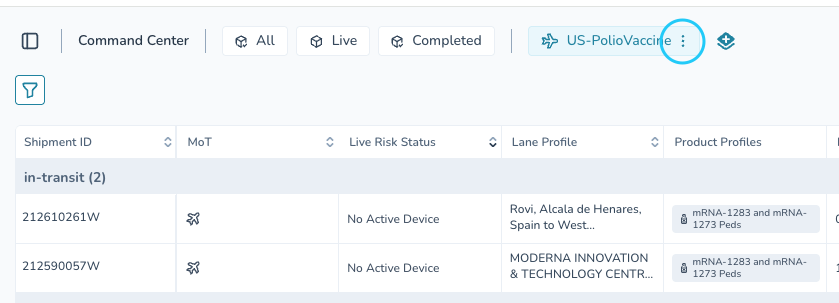
You can now explicitly extend saved views from Command Center to Insights CC, or from Temp Release to Insights TR — no more rebuilding views from scratch.
Private views by default; extend only the views you want to share across modules
Auto-sync toggle keeps view definitions synchronized across modules
Compatibility validation ensures filters work correctly in both modules
Dynamic date filters adjust automatically per module context
Why this matters: You spend time building perfect views in Command Center. Now you can instantly apply those same views to your Insights dashboard without rebuilding them. Views remain private until you choose to extend them.
Pagination for High-Volume Activity History ⭐
Activity history now handles shipments with 500+ transactions without performance issues or missing records.
Pagination loads activity in logical chunks rather than all at once
Works throughout the application for a consistent experience
Why this matters: Complex shipments with many state changes now generate complete activity histories that load quickly. Previously, high-transaction shipments would fail to generate any activity history at all.
Multi-Language Character Support in Signatures
Special characters that are native to other languages (Japanese, Chinese, Korean, etc.) are now accepted in Temperature Release signature flows.
Characters like '/' in Japanese no longer trigger validation errors
Full Unicode support for language-specific character sets
Maintains security validation for actual code injection attempts
Why this matters: Global shipments require local language support. Previously, valid language characters were incorrectly blocked, preventing users from signing off in their native language.
Clear Expiration Messaging for Share Links
When a shipment share link expires (after 180 days), you now see a clear message: "Cannot display shipment. This link has expired."
Why this matters: Previously, expired links showed "Shipment not Found," making you wonder if the shipment was deleted. Now you know exactly what happened and what to do next.
Export Options for Default Views
CSV download and email distribution actions are now available on all default views (all, live, completed), not just custom saved views.
Download shipment lists as CSV files for external analysis
Same export formatting as custom views
Why this matters: Default views like "All Shipments" are often the starting point for analysis. Previously, you had to recreate them as custom views just to export data.
🚀 Getting Started
All improvements are automatically available in your CONTXT dashboard. No action is required on your part.
For view extension, open the 3-dot context menu on any saved view to find the new "Extend view to Insights" option.
💡 Tips & Best Practices
🎯 Document Protection:
Download and archive critical shipment documents before approving Temperature Release reviews if you need local backup copies
Check the document lock status in the shipment details panel after approval
🎯 View Extension:
Start by extending your most-used views to save time building duplicate filters in Insights
Use the auto-sync toggle to keep frequently-changing views synchronized across modules
🎯 Activity History:
Use pagination to efficiently scan through large activity logs
Export activity history to PDF for compliance and audit documentation — exports are now fully accurate
🎯 Share Links:
Share links are valid for 180 days; refresh them periodically for team members who need recurring access
🆘 Need Help?
Questions about new features? Contact your Customer Success Manager
Technical issues? Submit a support ticket through the help desk
Feature requests? Share your feedback through the in-app feedback tool
Thank you for using CONTXT. We're committed to continuously improving your supply chain visibility with powerful, reliable tools.