Changelog: CONTXT v2.1
Last updated: April 1, 2026
Released January 29, 2026
We're excited to bring you CONTXT v2.1, focused on transparency, flexibility, and control across your logistics operations. This release delivers clearer shipment risk insights, comprehensive audit capabilities, and enhanced permission management for Temperature Release workflows.
🆕 What's New
Live Risk Status Clarity ⭐
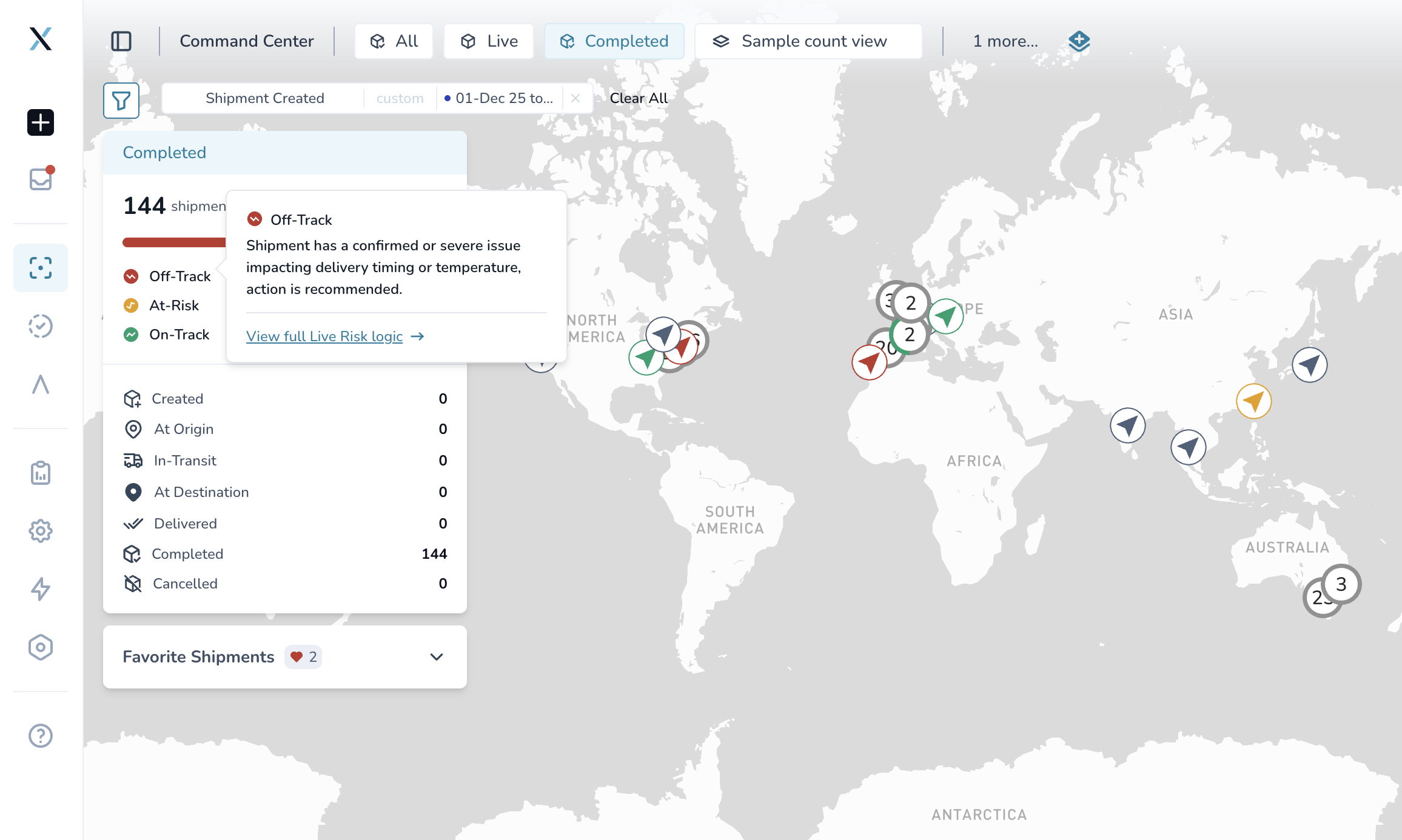
Understand exactly what your shipment status means
Interactive tooltips on On-Track, At-Risk, and Off-Track statuses explain what each classification means for your shipment
Direct links to documentation for complete business logic details
Why this matters: No more guessing about shipment risk classifications. Clear explanations help you make faster, better-informed decisions about which shipments need attention.
Download Complete Activity History
Export full audit trails for compliance and reporting
CSV download available for all activity logs across shipments, lane profiles, product profiles, user access groups, and workflows
Complete tracking of who changed what, when - including timestamps, user attribution, and before/after values
Action type logging captures created, updated, deleted, and uploaded events
Why this matters: Streamline compliance reporting, create external documentation, and analyze historical changes without manual data collection. Perfect for audit reviews and operational analysis.
Flexible Shipment ID Entry
Shipment IDs now accept spaces to match real-world formats
No more errors when creating Temperature Release shipments with IDs containing spaces
Accommodates various carrier formats like "ABC 123" or "SHIP 456 X" without workarounds
Seamless experience from creation through tracking
Why this matters: Work with shipment IDs exactly as they appear on carrier documentation. No more reformatting or technical errors during shipment creation.
Granular Reviewer Permissions for Temperature Release
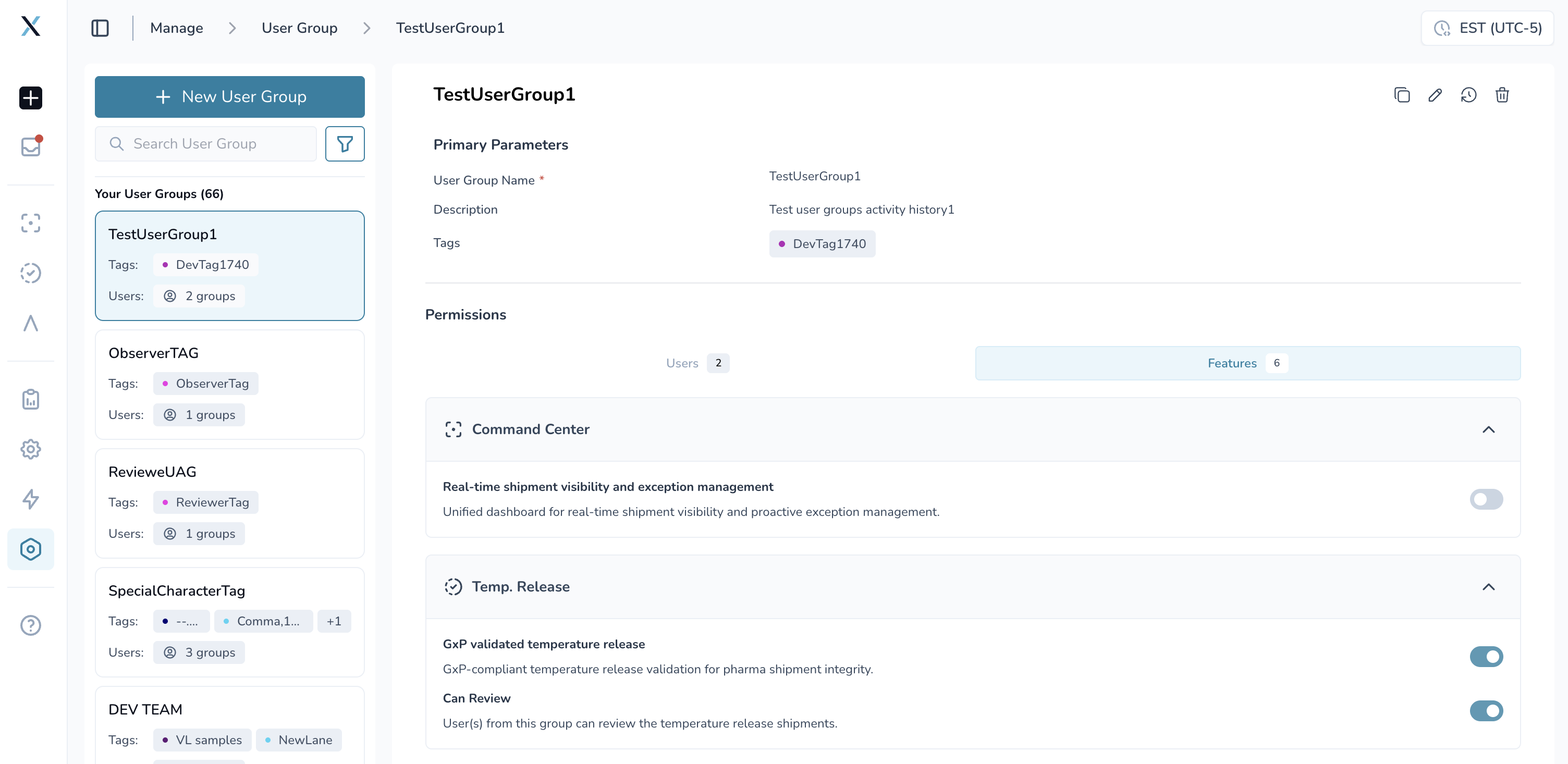
Control who can review vs who can only observe shipments
Reviewer toggle at User Group level lets you designate groups as "Reviewers" or "Observers."
Reviewers can view and approve Temperature Release shipments
Observers can view shipments but cannot submit reviews
Audit trail captures all permission changes
Backward compatible - existing groups maintain review capabilities by default
Why this matters: Implement proper segregation of duties for compliance. A small subset of your team can be authorized to review specific shipments while others maintain visibility. Perfect for delegation scenarios where not everyone who sees shipments should approve them.
How to use:
Navigate to User Access Groups
Select a group with Temperature Release access
Toggle "Can Review Shipments" on or off
Users in that group will now have reviewer or observer permissions accordingly
Marine Vessel Tracking Support
Track ocean leg shipments with external vessel position links
IMO-based tracking links automatically generated for sea shipments
One-click access to MarineTraffic vessel position data
Visibility during ocean transit even without active IoT device data
Why this matters: Monitor your ocean shipments' vessel positions during sea legs. While you won't have real-time temperature data during transit, you can track vessel location and estimated arrival times.
Enhanced Device Provider Support
Broader compatibility with temperature monitoring devices
New providers added: Truck Readout and tempmate now fully supported
"Other" category for additional device types
Seamless integration with existing device management workflow
🎨 Improved Experience
More Reliable Shipment Filters
Accurate counts after page refresh - no more showing "0 shipments"
Multi-filter handling fixed - Tag and Lane Profile filters now work correctly when applied together
Filter persistence when navigating between shipment list and details
Impersonation filter refresh - filters now update correctly after switching user context
Map view alignment - shipment counts now match between list and map views
Better Data Display
Excursion duration rounding - Temperature excursion times now round to the nearest minute for cleaner, more readable displays
Consistent formatting across all temperature deviation reports
🚀 Getting Started
All improvements are automatically available in your CONTXT dashboard. No action is required on your part.
Using Reviewer Permissions:
Go to Settings → User Access Groups
Select a group with Temperature Release enabled
Use the "Can Review Shipments" toggle to designate the group as Reviewers or Observers
Save changes - permissions apply immediately to all users in the group
Downloading Activity History:
Navigate to any shipment, lane profile, product profile, user access group, or workflow
Open the Activity History panel
Click the Download/Export button
Receive a CSV file with complete audit trail
💡 Tips & Best Practices
🎯 Managing Reviewer Permissions:
New groups default to Observer role - explicitly enable reviewer permissions when needed
Existing groups retain reviewer permissions to avoid disrupting workflows
Use reviewer permissions for compliance-sensitive workflows where approval authority matters
Combine with tags to create review authorization by shipment type or geography
🎯 Understanding Live Risk Status:
Hover over any risk status badge to see the explanation
Click "View full Live Risk logic →" link for comprehensive business logic documentation
Use tooltips to train team members on risk classification meaning
🎯 Using Activity History Downloads:
Export before major configuration changes for rollback reference
Schedule periodic exports for compliance documentation
Use timestamp and user attribution for operational review
🆘 Need Help?
Questions about new features? Contact your Customer Success Manager
Technical issues? Submit a support ticket through the help desk
Feature requests? Share your feedback through the in-app feedback tool
Your feedback on the new reviewer permissions and audit download features will help shape our next release.
Thank you for using CONTXT. We're committed to continuously improving your supply chain visibility with powerful, reliable tools.