Changelog: CONTXT v2.10
Last updated: June 9, 2026
Released June 11, 2026
This release introduces safer tag management with archive-and-restore capabilities, improved visibility into tag usage, clearer shipment route maps, and a more polished notification experience across CONTXT.
🆕 What's New
Safer Tag Management ⭐
Removing a tag is now a safe, reversible two-step process — archive first, permanently delete only when you're sure.
Archiving replaces deletion: removing a tag moves it to a new Archived tab instead of erasing it immediately
The Archived tab shows all archived tags, and you can unarchive any of them to bring them back into use
Permanent deletion is only allowed once a tag is no longer associated with any entity — if it's still in use, CONTXT alerts you and points you to the associated entities to clean up first
Impacted-entity tracking now includes shipments, alongside user access groups, lane profiles, and product profiles, so you can see everywhere a tag is used before removing it
Why this matters: Tags are often used across shipments, lane profiles, product profiles, and access groups. Archiving lets you safely retire tags without risking accidental removal of data or configuration relationships—and restore them at any time if needed.
How to use:
Go to Configuration → Tags and choose Archive on the tag you want to retire
Open the Archived tab to review archived tags
From there, Unarchive a tag to restore it, or Delete it permanently once it has no remaining associations
Read more in this article: Archive or Delete a Tag
🎨 Improved Experience
Workflow Notifications
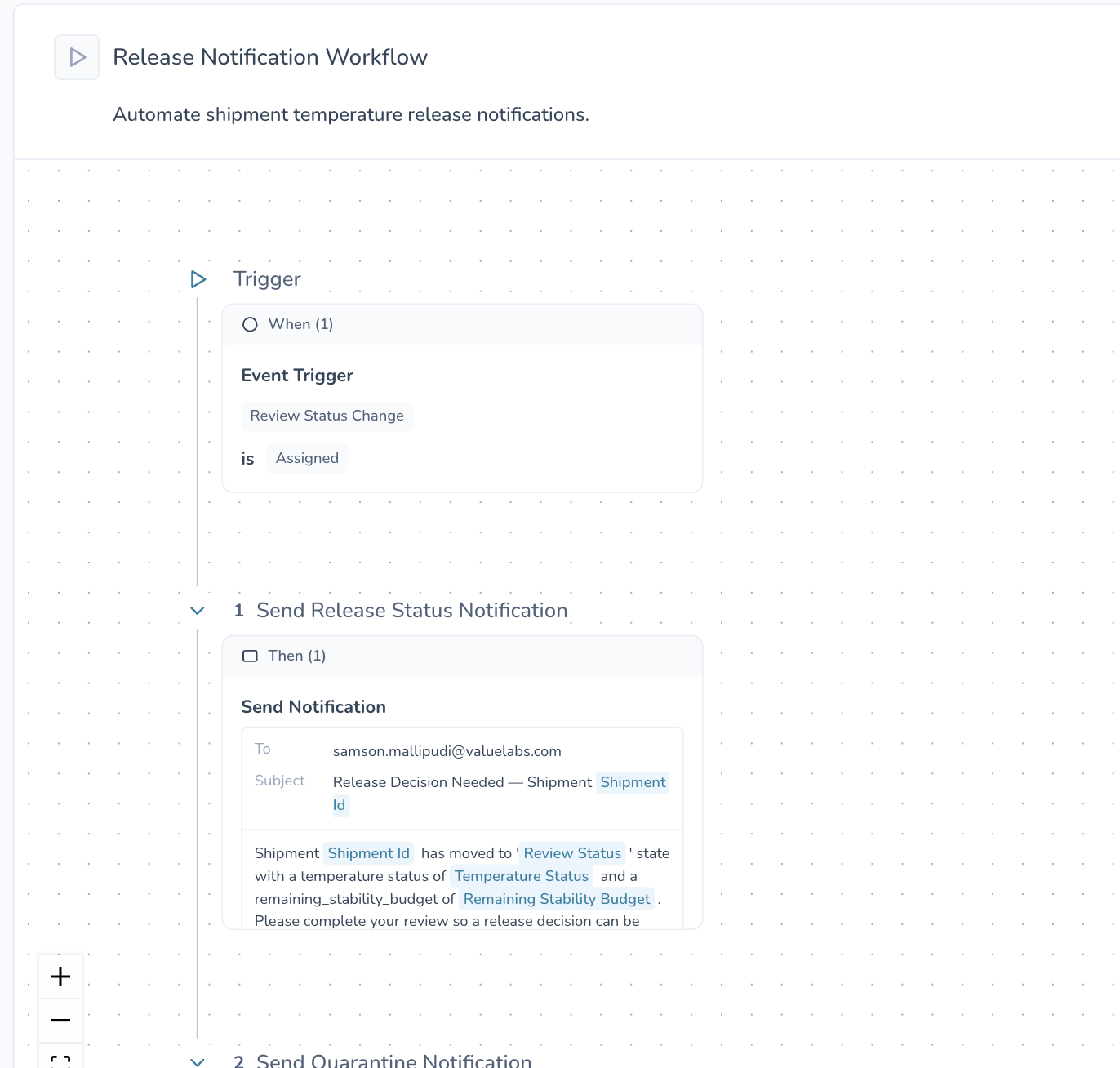
Workflow notification templates now use a structured email-style layout with dedicated fields for each section of the message, making notifications easier to create, review, and maintain.
Carrier Route Maps
Shipment route maps now more accurately reflect shipment progress. Route segments remain grey until the corresponding stop is completed, providing a clearer view of where a shipment has actually traveled.
Email Improvements
Invitation emails now display header and footer branding correctly for a more polished onboarding experience.
Temperature Release review-assignment emails now display cleaner messaging when an assigner's name is unavailable, ensuring recipients always receive a complete and understandable notification.
🚀 Getting Started
All enhancements in this release are available automatically. No configuration changes are required.
💡 Tips & Best Practices
🎯 Tag cleanup:
Before permanently deleting a tag, check its impacted entities — including shipments — from the tag list view
Use an archive for seasonal or temporarily unused tags so you can restore them later without rebuilding associations
🆘 Need Help?
Questions about new features? Contact your Customer Success Manager
Technical issues? Submit a support ticket through the help desk
Feature requests? Share your feedback through the in-app feedback tool
Thank you for using CONTXT. We remain committed to helping teams make faster, more confident supply chain decisions through intelligent automation and continuous product improvements.