Changelog: CONTXT v1.1.2
Last updated: December 3, 2025
Released November 17, 2025
We're excited to share the latest improvements to Command Center, focused on resolving critical issues affecting shipment visibility and data accuracy while expanding search capabilities across Command Center and Temperature Release environments.
 What's New
Batch ID Filtering for Temperature Release Shipments
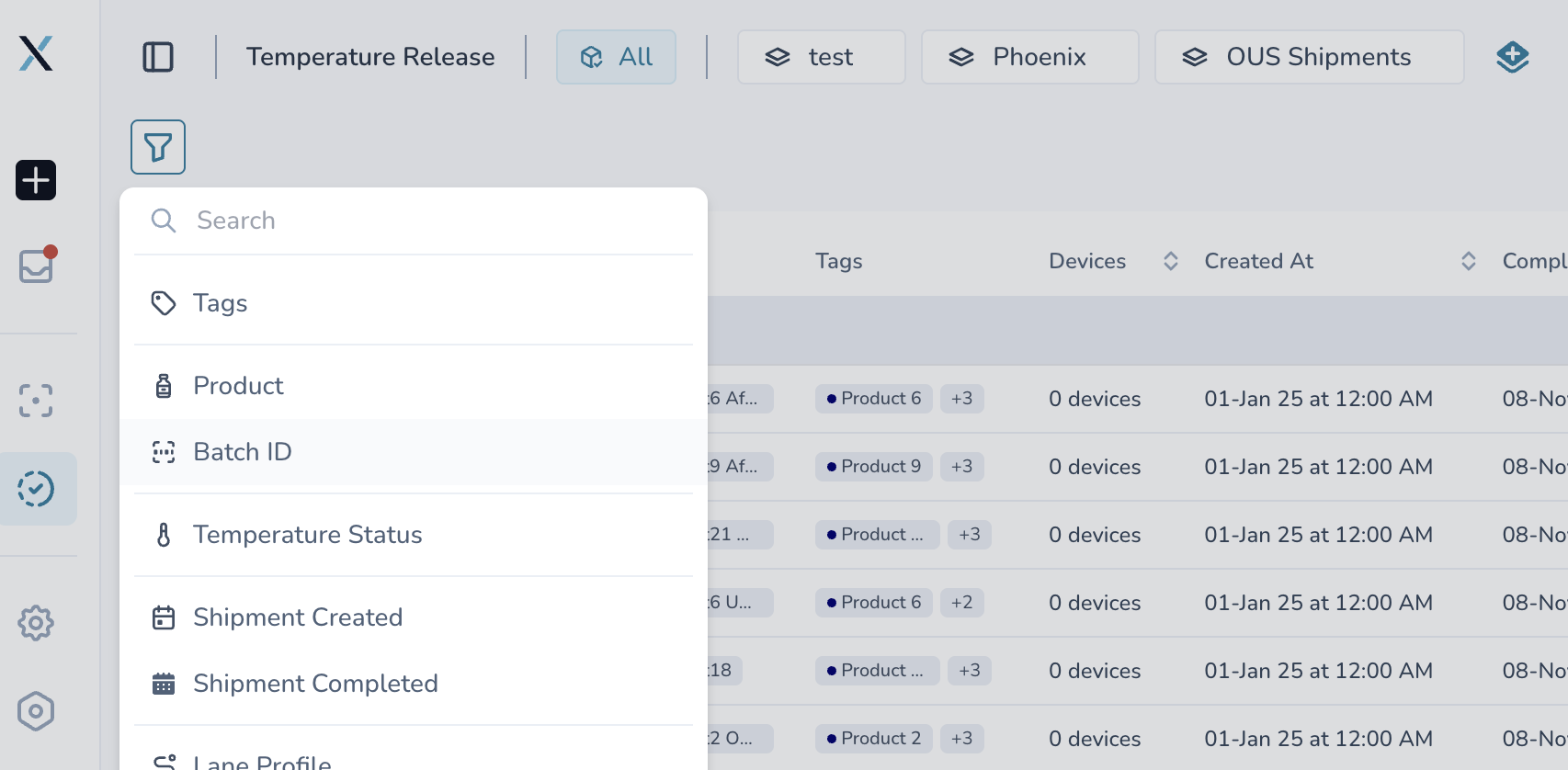
Get organized by manufacturing batch
Group shipments by batch ID: Filter Temperature Release shipments by their manufacturing batch identifier
Faster shipment lookup: Find all shipments from a specific batch instantly with dedicated batch filtering
Multi-filter compatible: Combine batch ID filtering with existing tag and status filters for precise views
Empty state handling: The System properly handles batches with no active shipments.
Product Information in Search Results
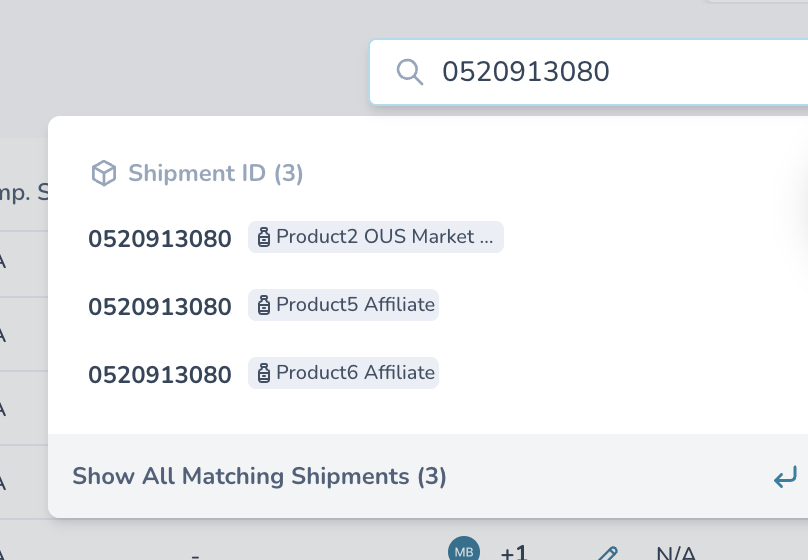
See product details without opening each shipment
Product name displayed: Search results now show product names alongside shipment IDs (e.g., "-20°C Palletized Drug Product")
Better context in searches: Instantly identify shipments by their product profile without clicking through
Cross-environment search: Search works consistently across Command Center and Temperature Release environments
Accurate shipment filtering: Search results no longer mix Command Center and Temperature Release shipments
External Share Links - Instant Data Loading
Faster access for external stakeholders
Complete data on load: External share links now load all shipment details, timeline events, and device information immediately
No empty data states: Shared links display full shipment context without waiting for additional requests
Better customer experience: External stakeholders see complete information instantly when you share a shipment link
Why this matters: When you share shipment visibility with external carriers or customers, they get immediate access to all relevant data without seeing loading states or empty screens.
 Critical Issues Fixed
Shipment Visibility Bug - Fixed 
External users now see the same shipments as admins
External users assigned to the same User Access Group were seeing significantly fewer shipments than admin users with identical tag assignments. This has been resolved, ensuring all users with the same tag access see consistent shipment lists.
What changed: External users with User Access Group tag assignments now see all completed shipments their group has access to.
Out of Memory Crashes - Resolved
Certain shipments now load without browser crashes
Some shipments with large device datasets were causing browser out-of-memory errors, making them completely inaccessible. We've optimized how stability metrics are calculated and displayed.
What changed: Shipments load successfully regardless of data volume. No more "Page unresponsive" errors when opening complex multi-device shipments.
 Improved Experience
Better Device Selection
Checkbox auto-select: Clicking any device row automatically selects its checkbox
Faster device management: No need to find and click the small checkbox - just click the row
Smoother Shipment Details
Fixed duplicate panes: Refreshing shipment details no longer displays duplicate information panels
Cleaner UI: More predictable and stable detail view experience
Improved Form Validation
Better date picker sizing: Activation and deactivation time pickers now display fully at all screen resolutions
Clear validation messaging: STR/PTR duration validation provides helpful hint text when there's a mismatch
Auto-clearing on error: Date fields automatically reset after validation errors for cleaner UX
Download Report Improvements
Cleaner feedback: Unnecessary "No attachments found" messages removed from download confirmations
Better completion messaging: Download complete messages now provide clear, concise feedback
Excursion Resolution Clarity
Disabled resolution when unavailable: For uploaded device data, resolution options are now hidden/disabled when not applicable
 Behind the Scenes
Search Engine Enhancements
Type-aware filtering: Search now properly distinguishes between Command Center and Temperature Release shipments
Product data integration: Search API now includes product profile information for richer results
 Getting Started
These improvements are automatically available in your Command Center dashboard. No action is required on your part - all features activate when you next log in.
Using the New Batch ID Filter:
Navigate to Temperature Release Shipments
Click the Filter button
Select "Batch ID" from the filter options
Choose the batch you want to review
View all shipments from that manufacturing batch
 Pro Tips
Multi-filter power: Combine Batch ID + Tag filters for precise compliance reviews
External sharing: Share specific shipments with customers - they'll see complete data instantly
Search efficiency: Product names now appear in search, so you can identify shipments without opening them
 Need Help?
Filter questions? Contact your Customer Success Manager for guidance on filter combinations that work best for your workflow
Technical issues? Submit a support ticket through the help desk
Feature requests? Share your feedback through the in-app feedback tool
Thank you for using Command Center. We're committed to continuously improving your pharmaceutical logistics management experience with reliable, accurate tools.