Changelog: CONTXT v2.6
Last updated: April 9, 2026
Released April 9, 2026
We're excited to bring you CONTXT v2.6, focused on transparency, reliability, and quality. This release makes temperature range evaluation logic visible on product profiles, adds just-in-time SSO provisioning, and delivers a wave of improvements across views, filters, tags, and multi-organization support.
🆕 What's New
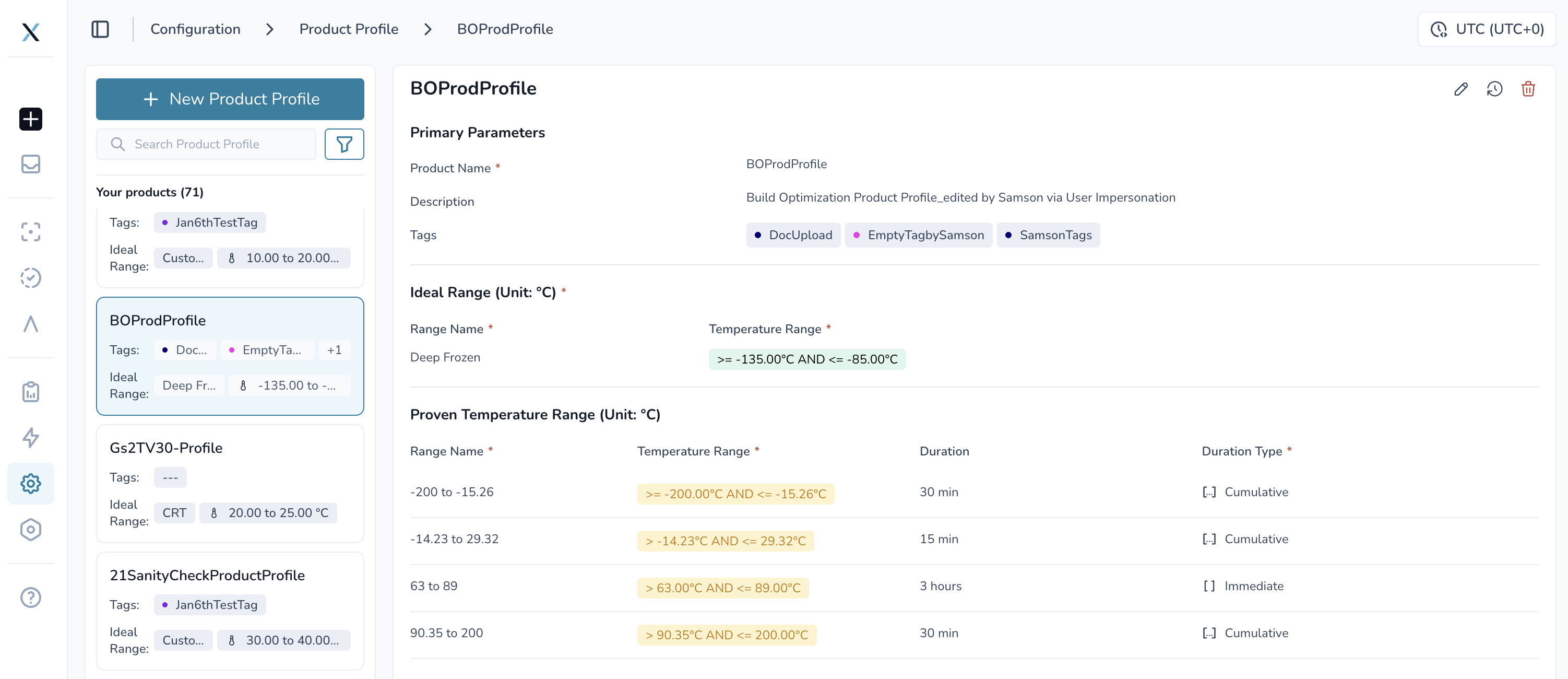
Comparison Operators on Product Profiles ⭐
You can now see the exact comparison operators (>, <, >=, <=) applied to your temperature ranges across all product profile screens — edit, review, and detail views.
Operators display for both STR (Shipping Temperature Range) and PTR (Product Temperature Range) boundaries • Color coding and operators carry through to Temperature Release shipment details, activity history, and PDF reports • Operators are read-only and automatically determined based on your range configuration
Why this matters: You can now instantly verify how your temperature range logic is being evaluated without guessing. This is especially important for regulatory documentation — your compliance records now show the complete picture with operators, values, and color coding all in one place.
Just-In-Time Provisioning for SAML SSO ⭐
SSO users are now automatically provisioned on first login via IDP-initiated SAML 2.0 flow — no email invitation needed.
Automatic user creation on first SAML login with correct role (admin or member)
Role and identity attributes mapped directly from your identity provider
Eliminates the email invitation step entirely for SSO-managed users
Why this matters: Your team members can log in and start working immediately on day one. Roles stay synchronized with your identity provider, reducing administrative overhead and ensuring consistency across systems.
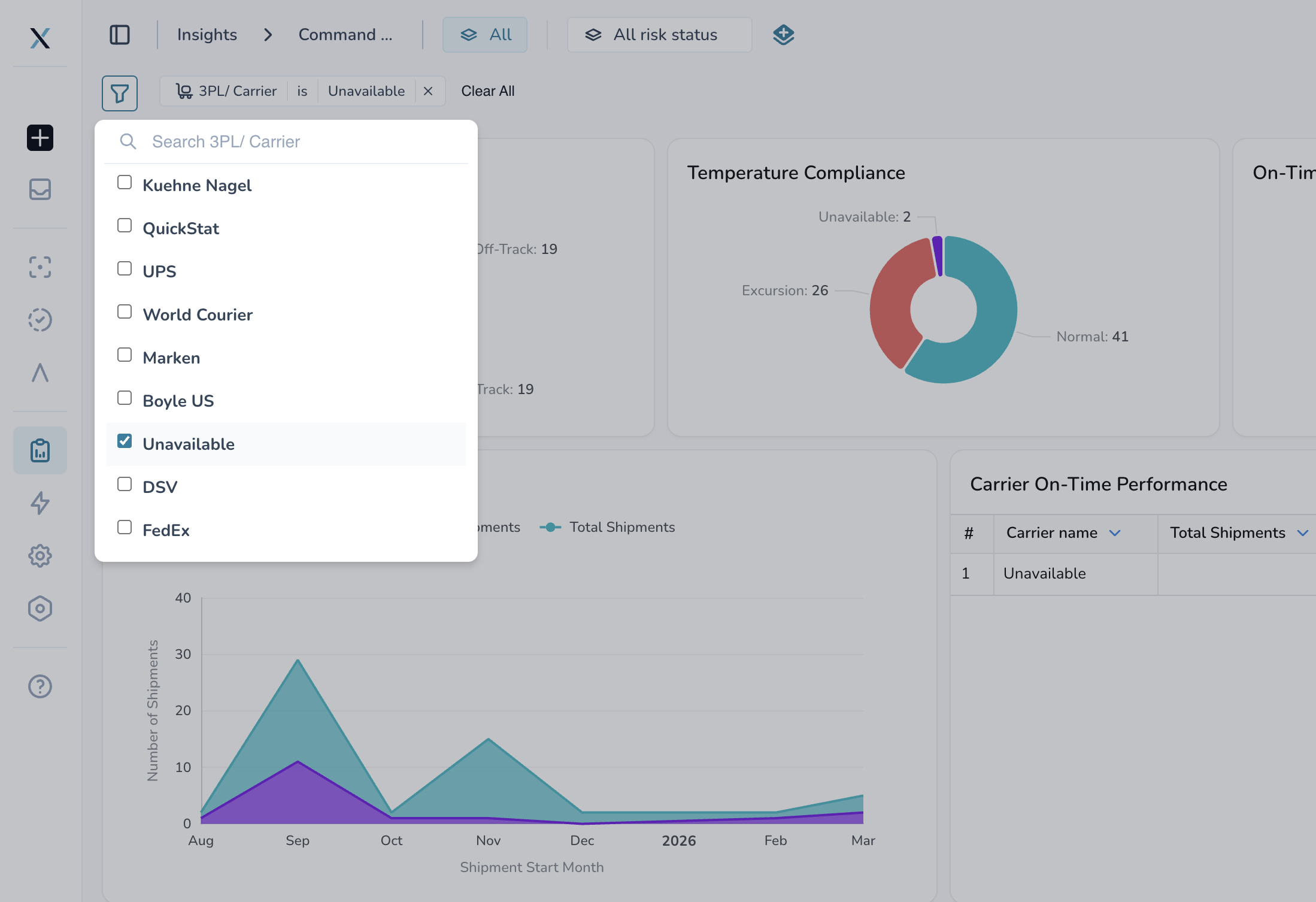
"Unavailable" Carrier Filter in Insights
The carrier filter dropdown in Command Center Insights now includes an "Unavailable" option, letting you isolate shipments that don't have carrier data assigned.
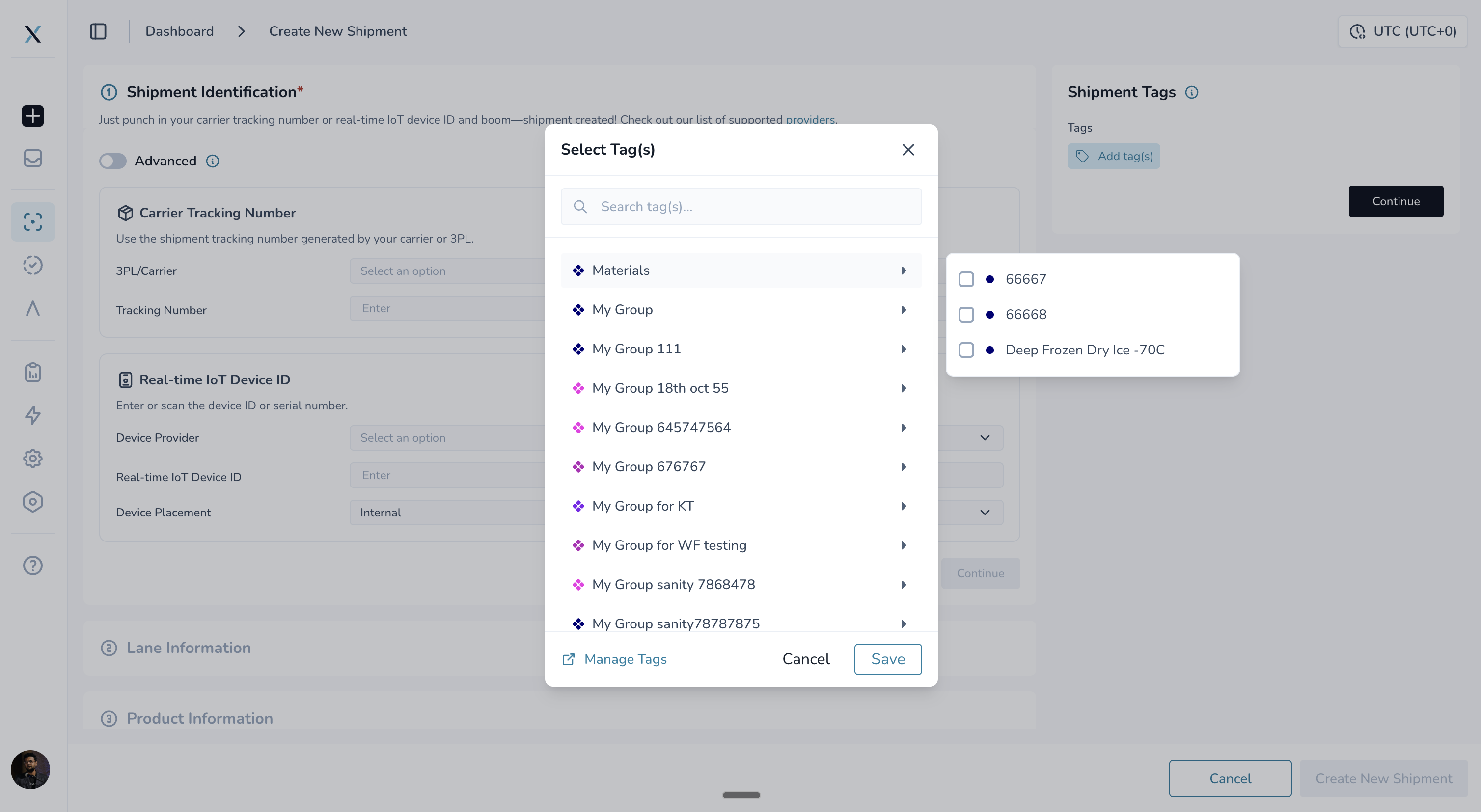
Tag Management Quick Link
Tag group popups now include a "Manage Tags" link, giving you quick access to tag configuration without navigating through menus.
🎨 Improved Experience
Accurate "Unsaved Changes" Alerts
The "You have unsaved changes" alert no longer fires falsely. If you type in an editable field and then cancel or revert your changes, the alert won't appear when you navigate away. It only fires when you have actual unsaved edits.
Flight and Vessel Tracking Links Preserved
Flight tracker and vessel tracking links now stay intact when carrier information is updated on shipments. Previously, these integration-provided URLs could disappear on follow-up updates, forcing you to re-fetch the data.
Timezone-Aware Date Filtering
Date range filters "Next 48 hours" now calculate correctly based on your timezone. Previously, certain timezones (like AKDT) would return dates off by one day.
Clean User Lists and Reports
Deleted users no longer show UUID strings in Temperature Release lists or downloaded reports — just clean, readable entries.
Smooth Multi-Organization Switching
Notifications and emails are now properly scoped to your current organization. Switching between organizations loads preferences reliably without errors.
Larger Tag Dropdowns
Tag selection modals are 25% larger, making them easier to read and interact with. Tag names are no longer cut off in search dropdowns.
Tag group popups now show correct colors for each group. Tags with long names wrap properly on smaller screens, and accordion directions are consistent across views.
🚀 Getting Started
All improvements are automatically available in your CONTXT dashboard. No action is required on your part.
For comparison operators, navigate to any product profile to see the new operator display on edit, review, and detail screens.
For SAML SSO provisioning, please reach out to PAXAFE customer success team to complete the IDP configuration needed to enable this functionality
💡 Tips & Best Practices
🎯 Product Profiles:
Review the operators on your product profiles to ensure they match your temperature control requirements
Check downloaded reports to confirm operators and color coding appear for audit trails
🎯 Views and Filters:
Use view icons and colors to quickly identify your saved views in the header
Check toast notifications when auto-syncing views to ensure all children synced
Combine multiple tag filters in profiles for more precise filtering
🆘 Need Help?
Questions about new features? Contact your Customer Success Manager
Technical issues? Submit a support ticket through the help desk
Feature requests? Share your feedback through the in-app feedback tool
Thank you for using CONTXT. We're committed to continuously improving your supply chain visibility with powerful, reliable tools.