Changelog: CONTXT v1.2.2
Last updated: January 30, 2026
Released December 11, 2025
We're excited to share the latest improvements to CONTXT, focused on enhanced data visibility, improved system monitoring, and a smoother user experience across temperature release workflows and shipment management.
🆕 What's New
Temperature Release View Downloads ⭐
Export your filtered temperature release data directly to CSV
Download any view: Export exactly what you see in your filtered views, not the entire dataset
Comma-separated format: Standard CSV format with comma delimiters for seamless import into Excel and other tools
Instant access: Download button available in the view menu for quick data exports
Why this matters: Get the exact temperature release data you need for analysis, compliance reporting, or sharing with stakeholders without manual filtering or reformatting.
Sentry Error Monitoring Integration
Real-time error tracking and performance monitoring are now enabled across the CONTXT platform. This integration automatically captures application errors, performance issues, and user experience problems, enabling our team to identify and resolve issues proactively before they impact your workflow.
Why this matters: Faster bug detection and resolution mean fewer disruptions to your daily operations and a more stable platform experience.
🔧 Fixes
Temperature Release Improvements
Review submission fixed after report download: You can now submit reviews immediately after downloading temperature reports without encountering database constraint errors
Excursion timing validation updated: Manual device uploads now accept temperature excursions at the beginning or end of shipments, reflecting real-world scenarios
Data Accuracy & Display
Accurate shipment counts in filtered views: Filter counts now correctly reflect applied tag filters across both command center and temperature release views
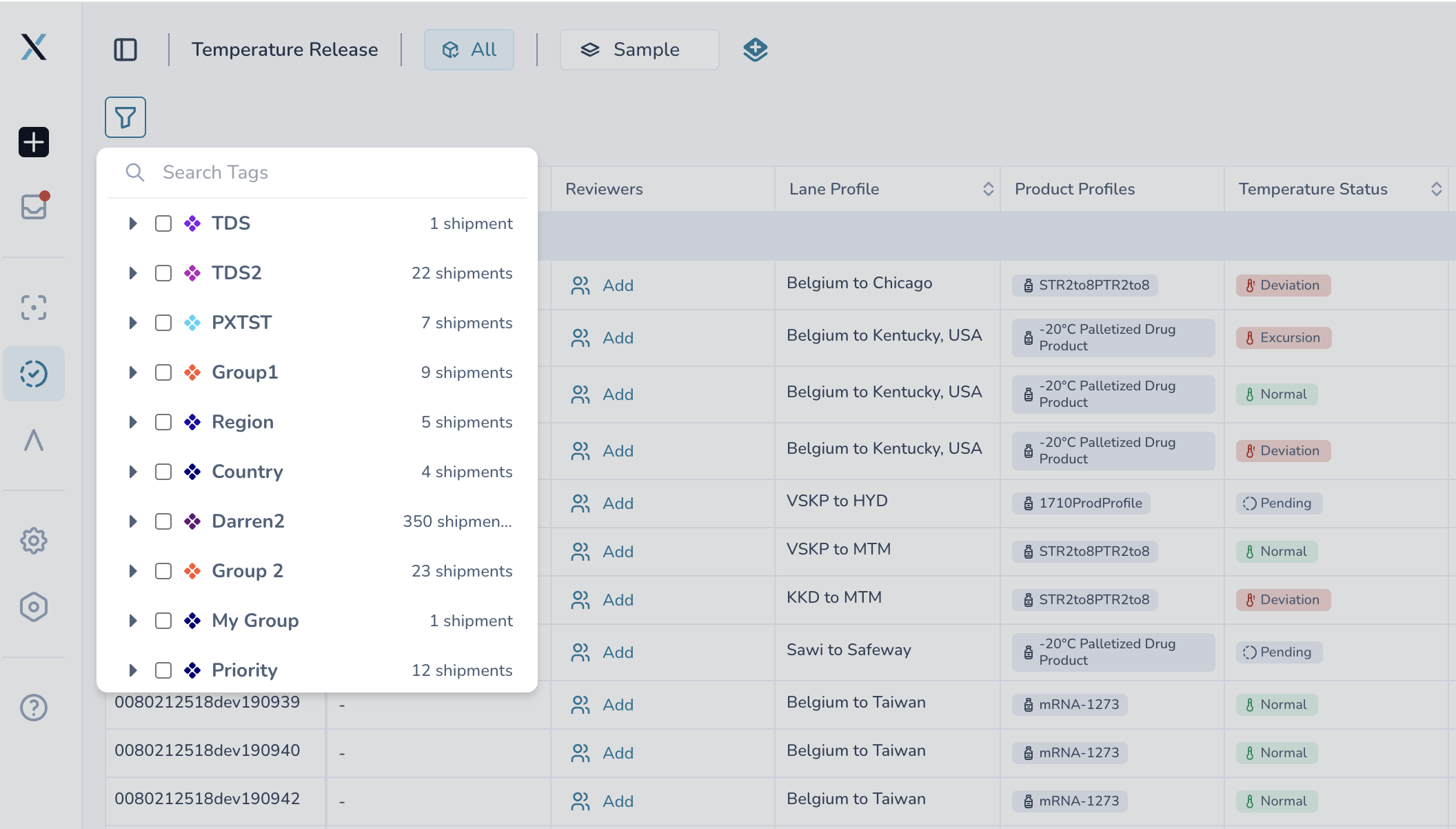
Dynamic filter counts during view creation: When creating or editing views, filter counts now update based on previously applied filters, showing you exactly how many shipments match each combination
Deleted user handling: Reviewer columns now display "Deleted User" instead of cryptic user IDs when a reviewer has been removed from the system
Ocean transport mode in audit trail: Lane profile audit history now correctly displays "Ocean" instead of "Marine" for ocean shipments
🎨 Improved Experience
Better Data Management
Export optimization: CSV downloads now use comma separators (standard format) instead of semicolons for better compatibility
Preference-based exports: Downloaded views respect your column preferences, exporting only the data you've chosen to display
💡 Tips & Best Practices
🎯 Make the most of temperature release downloads:
Set up your column preferences before downloading to get exactly the data you need
Use filtered views to create focused exports for specific analysis or reporting needs
Export data regularly for offline analysis or long-term record keeping
Standard CSV format means easy import into Excel, Google Sheets, or data analysis tools
🆘 Need Help?
Questions about new features? Contact your Customer Success Manager
Technical issues? Submit a support ticket through the help desk
Feature requests? Share your feedback through the in-app feedback tool
What's next? We're continuing to enhance data export capabilities and working on additional user experience improvements. Your feedback on the new download features helps shape our roadmap.
Thank you for using CONTXT. We're committed to continuously improving your supply chain visibility and temperature monitoring with powerful, reliable tools.